Index configuration
Contents
Indexing is the process of extracting, processing and storing a search-optimized version of the property value.
Properties are mapped to specific indexes based on their value type and the node’s Index config — as illustrated below:
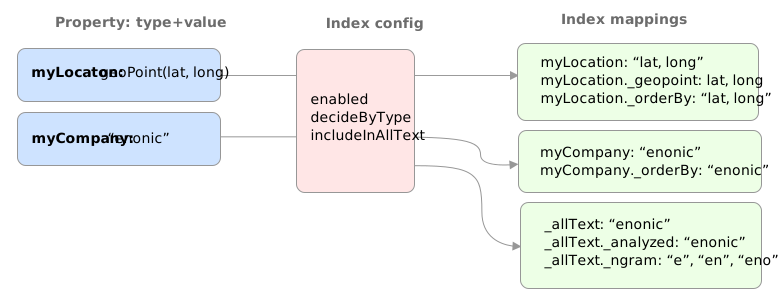
Index Mappings
When nodes are persisted, the property values are instantly indexed. A single property can be indexed multiple times - each index is referred to as an index mapping.
Each mapping enables specific query capabilities:
text
The default mapping used for all value types.
number
Effectively handles any numeric value
datetime
Handles any date value
geoPoint
Supports earth based geographical locations
ngram
nGram-mappings are accessed via queries, using the nGram-function. An nGram-analyzed field will index all substring values from 2 to 25 characters.
Consider a String property, with the value article. ngram indexing will split the string into the following tokens when analyzed::
'ar', 'art', 'arti', 'artic', 'articl', 'article'
For more information about how the nGram-function works, check out the nGram-function.
analyzed
Splits the string into tokens for effective free text search. Used by the fulltext query expression (and the legacy fulltext() NoQL function).
Consider a String property, with the value This is test-driven development When analyzed, it is split into the following tokens:
'this', 'is', 'test', 'driven', 'development'
stemmed
Language optimized version of the analyzed index mapping. Used by the stemmed query expression (and the legacy stemmed() NoQL function).
Tokens are trimmed based on language specific features such as plurals and gender specific endings. Consider the following sentence stemmed for English content: "The monkey loved bananas". When indexed, the result will be something like:
'the', 'monkey', 'love' 'banana'
The same stemming algorithm is added to queries, supporting hits for queries like: "banana love", even if the strings do not match
path
The path-elements (separated by default path-separator '/') are indexed as tokens.
orderby
Any indexed property automatically gets the orderby index mapping as well. The orderby index mapping lets us sort text and numbers in a natural way across properties and different value types.
Collation By default, orderby uses UNICODE collation, which is fast but comes with some limitations in regards to locale-specific sorting, as well as capital-case vs lowercase. Locale-specific collation can optionally be enabled on a per-field basis via Index config. This means you may force sorting for a specific language, such as sorting "ä" after "z" in Swedish.
| The CMS (Content API) automatically adds locale-aware indexing for the displayName property, should you need it in your queries. |
Read more about collation in the Sort DSL section.
_allText
Nodes that contain indexed String values, typically gets a generated system property called _allText. This property has the valueType String, and by default get indexed as text, ngram, and analyzed.
The allText’s indexing is customizable via the node’s Index config.
The property is commonly used in "search everything" approaches.
When defining custom index configurations, you may choose if a property will be included in _allText, or not. (includeInAllText is set to true/false) |
Index config
By default, properties are indexed based on their specific value type. This strategy is known as decideByType.
Every now and then, you may need more detailed control of how your properties are indexed. This is where the index config comes in.
The index config allows you to provide detailed instructions on how the properties of a node should be indexed.
The index config itself is stored as a property on the node. A basic index config might look something like this:
"_indexConfig": {
    "default": {  (1)
        "enabled": true,
        "decideByType": false,
        "nGram": false,
        "fulltext": false,
        "includeInAllText": false,
        "path": false,
        "indexValueProcessors": [],
        "languages": []
    },
    "configs": [   (2)
        {
            "path": "myProperty",   (3)
            "config": {   (4)
                "enabled": true,
                "decideByType": false,
                "nGram": true,
                "fulltext": true,
                "includeInAllText": true,
                "path": false,
                "languages": []
            }
        },
        {
            "path": "mySet.**",   (5)
            "config": {
                "enabled": true,
                "decideByType": false,
                "nGram": false,
                "fulltext": false,
                "includeInAllText": false,
                "path": false,
                "languages": ['en','no']  (6)
            }
        }
    ],
    "allText": {  (7)
        "enabled": true,
        "nGram": true,
        "fulltext": true,
        "languages": []
    }
}| 1 | default is the default config for all properties (unless overridden) |
| 2 | configs overrides the default config for properties matching specified path |
| 3 | path specifies the Property paths the config applies to |
| 4 | config is the specific overriding config |
| 5 | mySet.** applies to all sub properties of "mySet" |
| 6 | languages enables language-specific stemming and collation indices for matched properties. Read more in the Languages section below. |
| 7 | allText customizes the indexing of the _allText property. Read more in the _allText section above. |
Options
The following options can be added to a configuration entry:
- enabled
-
If false, indexing will be disabled for the affected properties
- decideByType
-
If true, indexing is done based on the property’s value type. I.e. numeric values are indexed as both
textandnumber. - fulltext
-
Values are indexed as
analyzed, enabling the fulltext query expression - nGram
-
Values are indexed as
ngram, enabling the nGram-function in queries - path
-
Values are indexed as
pathand applicable for the pathMatch-function - includeInAllText
-
Affected values will be added to the
_allTextproperty - languages
-
Generates a stemming index (where supported) and a collation index for each specified language. Read more in the Languages section below.
Property paths
All config entires, with exception of default must specify a path. The path element defines the property scope within the node where this index configuration applies.
Paths follow the propertyPath format, optionally including double wildcard character **.
Examples:
myProperty.**myProperty.*myProperty*.**myProperty.myNameLanguages
In general indexing and querying is language agnostic, but for string properties, you can specify a language to enable Stemming and Collation.
Configuration
To activate language-specific indexing for specific properties, you must specify this explicitly in the index configuration. For each specified language, a stemming index (where supported) and a collation index will be created.
| Language-specific indexing slows down indexing and increases the index size, so it should only be used when explicitly needed. |
"_indexConfig": {
    "default": "byType",
    "configs": [
        {
            "path": "title",
            "config": {
                "enabled": true,
                "decideByType": false,
                "fulltext": true,
                "includeInAllText": true,
                "languages": ["en"]  (1)
            }
        },
        {
            "path": "description_no",
            "config": {
                "enabled": true,
                "decideByType": false,
                "fulltext": true,
                "includeInAllText": true,
                "languages": ["no"]  (2)
            }
        }
    ]
}| 1 | English indexing for the title property |
| 2 | Norwegian indexing for the Norwegian description |
"_indexConfig": {
    "allText": {
        "languages": ["en"]  (1)
    }
}| 1 | Enables English stemming and collation for the _allText |
Supported languages
Language codes are specified in the la[-co] format, where:
The columns of the table below mean:
- Stemming
-
yesmeans a stemming index is generated;-means stemming is not supported for this language. - Collation
-
custommeans the language’s ICU/CLDR collation tailoring is applied;DUCETmeans the language-neutral fallback is used (also applied for any language not listed here). See the ICU collation guide for the exact per-language rules.
| ISO Code | Language | Stemming | Collation |
|---|---|---|---|
|
af |
Afrikaans |
- |
custom |
|
sq |
Albanian |
- |
custom |
|
ar |
Arabic |
yes |
custom |
|
hy |
Armenian |
yes |
custom |
|
az |
Azerbaijani |
- |
custom |
|
eu |
Basque |
yes |
DUCET |
|
be |
Belarusian |
- |
custom |
|
bn |
Bengali |
yes |
custom |
|
bs |
Bosnian |
- |
custom |
|
pt-br |
Brazilian |
yes |
DUCET |
|
bg |
Bulgarian |
yes |
custom |
|
ca |
Catalan |
yes |
DUCET |
|
zh |
Chinese |
yes |
custom |
|
hr |
Croatian |
- |
custom |
|
cs |
Czech |
yes |
custom |
|
da |
Danish |
yes |
custom |
|
nl |
Dutch |
yes |
DUCET |
|
en |
English |
yes |
DUCET |
|
et |
Estonian |
- |
custom |
|
fo |
Faroese |
- |
custom |
|
fi |
Finnish |
yes |
custom |
|
fr |
French |
yes |
DUCET |
|
gl |
Galician |
yes |
custom |
|
de |
German |
yes |
DUCET |
|
el |
Greek |
yes |
DUCET |
|
he |
Hebrew |
- |
custom |
|
hi |
Hindi |
yes |
custom |
|
hu |
Hungarian |
yes |
custom |
|
is |
Icelandic |
- |
custom |
|
id |
Indonesian |
yes |
DUCET |
|
ga |
Irish |
yes |
DUCET |
|
it |
Italian |
yes |
DUCET |
|
ja |
Japanese |
yes |
custom |
|
kk |
Kazakh |
- |
custom |
|
ko |
Korean |
yes |
custom |
|
lv |
Latvian |
yes |
custom |
|
lt |
Lithuanian |
yes |
custom |
|
mk |
Macedonian |
- |
custom |
|
no |
Norwegian Bokmål |
yes |
custom |
|
nn |
Norwegian Nynorsk |
yes |
custom |
|
fa |
Persian |
yes |
custom |
|
pl |
Polish |
- |
custom |
|
pt |
Portuguese |
yes |
DUCET |
|
ro |
Romanian |
yes |
custom |
|
ru |
Russian |
yes |
custom |
|
sr |
Serbian |
- |
custom |
|
sk |
Slovak |
- |
custom |
|
sl |
Slovenian |
- |
custom |
|
ku |
Sorani |
yes |
DUCET |
|
es |
Spanish |
yes |
custom |
|
sv |
Swedish |
yes |
custom |
|
th |
Thai |
yes |
custom |
|
tr |
Turkish |
yes |
custom |
|
uk |
Ukrainian |
- |
custom |
|
ur |
Urdu |
- |
custom |
|
vi |
Vietnamese |
- |
custom |
Both no and nb resolve to Norwegian Bokmål and can be used interchangeably; nn (Nynorsk) is a separate entry. Brazilian Portuguese is keyed as pt-BR. |
Stemming
Stemming is a powerful feature for improving search relevance in multilingual systems. It works by reducing words to their root form, making search results more flexible and user-friendly.
When a property is configured with a language-specific stemming index:
-
During indexing: The text is tokenized and each token is reduced to its stem (root form)
-
During search: The search query is also stemmed using the same algorithm
-
Matching: The stemmed tokens from the query are compared against the stemmed index
This means that searches for "running", "runs", or "ran" can all match content containing "run" and vice versa.
Collation
The default UNICODE sorting works in most cases, but does not cover special scenarios such as sorting the Norwegian characters Æ, Ø, and Å correctly. This is where collation comes into play.
For each supported language specified, an additional orderby index is created, applying that language’s collation rules when sorting. Languages without specific rules fall back to DUCET, a language-neutral ordering.
| Sorting by a collation index is slower at query time than the default UNICODE sort. |
Templates
For simplicity, index configs may also be defined using a shorthand format. Rather than providing a full config object, you may instead reference a standard template.
"_indexConfig": {
    "default": "byType",  (1)
    "configs": [
        {
            "path": "myProperty",
            "config": "fulltext"  (2)
        }
    ]
}| 1 | Referencing the template "byType" |
| 2 | Referencing the template "fulltext" |
The following templates are available:
none
Turns off indexing completely
"config": {
    "enabled": false,
    "decideByType": false,
    "nGram": false,
    "fulltext": false,
    "includeInAllText": false,
    "path": false
}
byType
Indexing based on valueType
"config": {
    "enabled": true,
    "decideByType": true,
    "nGram": false,
    "fulltext": false,
    "includeInAllText": false,
    "path": false
}
fulltext
Activates common text indexing options
"config": {
    "enabled": true,
    "decideByType": false,
    "nGram": true,
    "fulltext": true,
    "includeInAllText": true,
    "path": false
}
path
Turns on path specific indexing
"config": {
    "enabled": true,
    "decideByType": false,
    "nGram": false,
    "fulltext": false,
    "includeInAllText": false,
    "path": true
}
minimal
Will only create orderby indexes
"config": {
    "enabled": true,
    "decideByType": false,
    "nGram": false,
    "fulltext": false,
    "includeInAllText": false,
    "path": false
}