Rendering rich text
Contents
In this chapter you will make the links and images in the biography work, by giving the RichText component your own renderers.
Background
Rich text in Enonic may contain links to other content, links to media, and images. In the response from Guillotine, each of them is represented twice:
-
as an element in
processedHtml, carrying a reference -
as an entry in
linksorimageswith the same reference, holding the details: the content a link points to, or the URL parts of an image
RichText matches the two. For every link and image in the HTML, it calls a renderer and passes the matching entry as data. The default renderers output the HTML as it is. By supplying your own, you decide what each link and image becomes in your application.
Task: Add link and image renderers
-
Add the
Linkcomponent - Create the following file:src/components/Link.tsximport type {LinkComponent} from '@enonic/react-components'; import {Link as RouterLink} from 'react-router-dom'; import {mediaUrl} from '../api'; export const Link: LinkComponent = ({children, data, href, target, title}) => { if (!data) { return <a href={href} target={target} title={title}>{children}</a>; } if (data.media) { const url = mediaUrl(data.media.mediaUrl); return url ? <a href={url} target={target} title={title}>{children}</a> : <>{children}</>; } const content = data.content; if (content?.type?.endsWith(':person') && content._name && content._id) { const queryString = typeof data.pageUrl === 'object' ? data.pageUrl?.queryString || '' : ''; const to = `/p/${encodeURIComponent(content._name)}/${content._id}${queryString}${data.fragment || ''}`; return <RouterLink to={to} title={title}>{children}</RouterLink>; } return <>{children}</>; };The renderer handles four cases:
-
An ordinary link, such as an external URL, has no
dataand is rendered unchanged. -
A link to media is resolved with the
mediaUrlhelper. -
A link to a person becomes a router link to
/p/<name>/<id>, built from_nameand_idof the content. The application handles the navigation without reloading the page. -
A link to other content is rendered as plain text, since the application has no page to show it.
-
-
Add the
Imagecomponent - Create the following file:src/components/Image.tsximport type {ImageComponent} from '@enonic/react-components'; import {mediaUrl} from '../api'; export const Image: ImageComponent = ({data, alt, sizes, style}) => { const src = mediaUrl(data?.src); if (!src) { return null; } const srcSet = data?.srcset?.map(source => `${mediaUrl(source.imageUrl)} ${source.width}w`).join(', '); return <img alt={alt} sizes={sizes} src={src} srcSet={srcSet} style={style}/>; };The renderer resolves
data.srcand every entry indata.srcsetwith themediaUrlhelper, and keeps thealt,sizesandstylevalues from the HTML. An image that cannot be resolved is left out. -
Use the renderers - Replace the contents of
src/components/Person.tsxwith the following. It imports the two renderers and passes them toRichText:src/components/Person.tsximport type {RichTextData, RichTextMetaData, ContentTypeData, UrlParts} from '@enonic/react-components'; import {RichText} from '@enonic/react-components'; import {useEffect, useState} from 'react'; import {Link as RouterLink, useParams} from 'react-router-dom'; import {Image} from './Image'; import {Link} from './Link'; import {fetchGuillotine, mediaUrl} from '../api'; import PERSON_QUERY from '../queries/Person'; import styles from './Person.module.css'; type PersonContent = { _path: string data: { bio: RichTextData photos: { imageUrl: UrlParts | null attachments: { name: string }[] }[] } displayName: string }; export function Person() { const { personId = '' } = useParams(); const [person, setPerson] = useState<PersonContent | null>(); const [error, setError] = useState<Error>(); useEffect(() => { fetchGuillotine<{get: PersonContent | null}>(PERSON_QUERY, {personId}) .then(result => setPerson(result.get)) .catch(setError); }, [personId]); if (error) { return <p>Failed to load person: {error.message}</p>; } if (person === null) { return <p>Person not found</p>; } if (!person) { return null; } const { data: { bio, photos }, displayName } = person; // Minimal meta and component data required by RichText const meta: RichTextMetaData = { type: 'person', id: personId, path: person._path, mode: 'inline' }; const component: ContentTypeData = { contentType: 'person', type: 'contentType' }; return ( <div className={styles.person}> <h2>{displayName}</h2> <RichText className={styles.bio} data={bio} meta={meta} component={component} Image={Image} Link={Link} tag='article' /> { photos.length > 0 && <h4 className={styles.photosheader}>Photos</h4> } <div className={styles.photos}> { photos.map((photo, i) => { const title = photo.attachments?.[0]?.name || displayName; return <img key={i} src={mediaUrl(photo.imageUrl)} title={title} alt={title} width="500" />; }) } </div> <RouterLink to="/">Back to list</RouterLink> </div> ); } -
Verify the result - Open Léa Seydough again. The image is now in place, and clicking
Daniel Carrigearin the biography takes you to his page: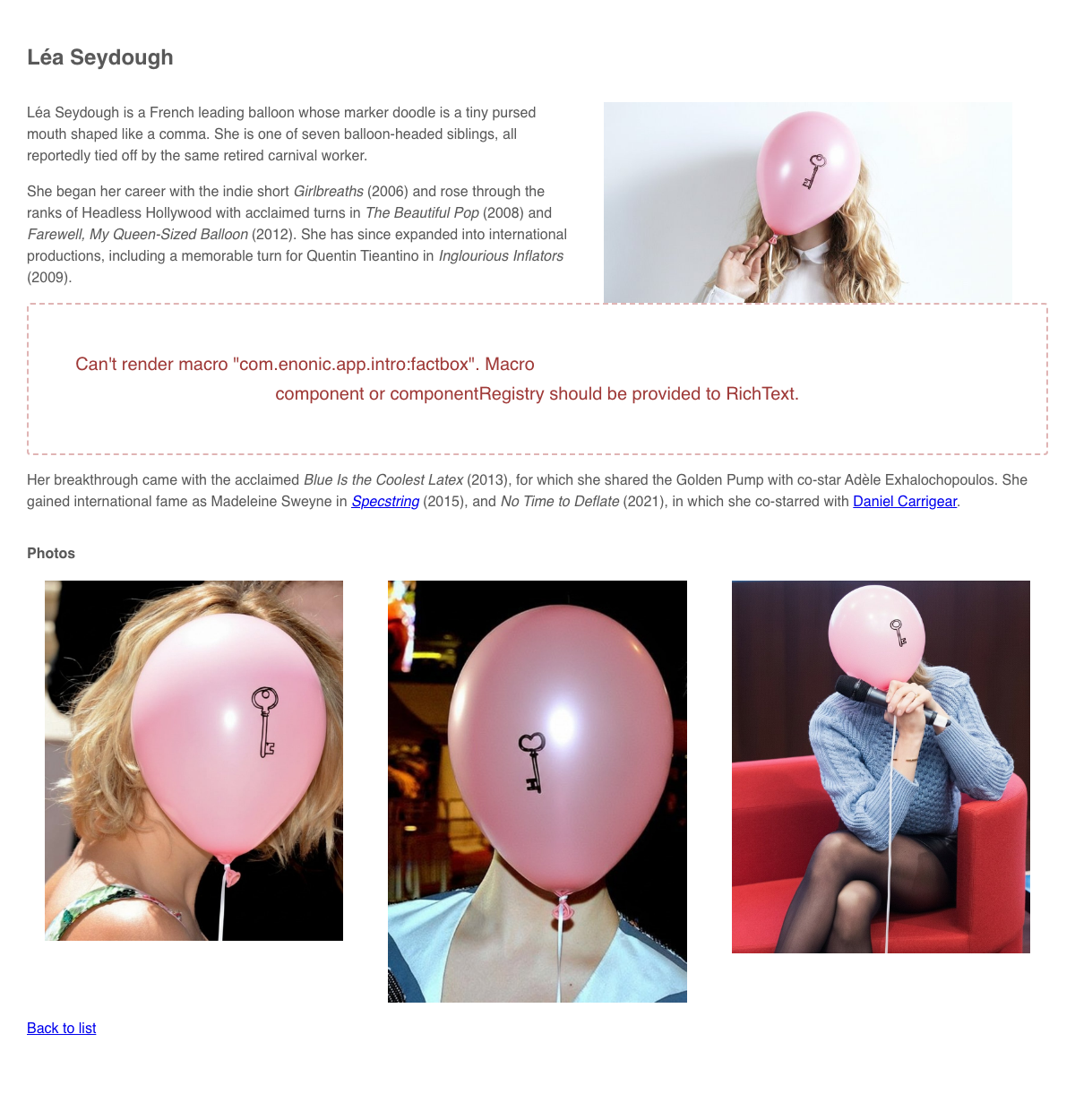
Summary
You’ve added Link and Image renderers and passed them to RichText. Links between persons now go through the router, and media links and images resolve to working URLs.
The error message in the biography is still there. It comes from a fact box, which RichText does not know how to render yet. Next, you’ll render macros with your own React components.