Rich text
Contents
Guillotine exposes HtmlArea fields as the RichText type, with raw and processed HTML plus structured information about links, images and macros.
The examples use the myproject project and an illustrative com.example.myapp:post content type. Replace the project, content paths, generated type names and form fields with those shown in your Playground schema. Send these queries using the request format on the Usage page.
Processed HTML
Retrieve blog posts with an author reference, tags and an HtmlArea field named text:
{
  guillotine(project: "myproject", branch: "master") {
    queryDsl(
      query: {
        term: {
          field: "type"
          value: { string: "com.example.myapp:post" }
        }
      }
      first: 10
    ) {
      ... on com_example_myapp_Post {
        data {
          author {
            displayName
          }
          tags
          text {
            processedHtml
          }
        }
      }
    }
  }
}
processedHtml is the HtmlArea value processed by XP’s processHtmlParts, for the scope selected with scopeKey, or for the project without it. It contains HTML with placeholders for internal links, images and macros. The structured fields described below hold what your client needs to render them; XP’s reference describes how each is resolved. These fields are Portal API extensions.
Browsers cannot follow the link and image placeholders as they are. Render each one by rewriting the element that carries a data-link-ref or data-image-ref attribute from its entry in links or images.
Links
Each internal link receives a data-link-ref attribute naming its entry in the links field, and an href placeholder.
Build the href from the link’s entry. For a page link, use pageUrl: baseUrl, or your frontend’s own base when it is null, followed by path, queryString and the link’s fragment, or adapt path to your frontend’s routes. fragment holds its leading #, and is empty when the link has none. See Base URLs. For a media link, put your media base in front of media.mediaUrl.path and media.mediaUrl.queryString.
A link that does not resolve, such as one to a content that is missing, has an entry with a null pageUrl, or a null media.mediaUrl for a media link. Decide how to render it, for instance as its text alone.
For instance, the processed value of a link looks like this:
<p>
    <a title="Tooltip"
        href="/posts/related-post"
        data-link-ref="e72f48b6-a972-4133-a300-a3ab5d132800">Link 1</a>
</p>
The GraphQL query below will process links inside the field:
query {
  guillotine(project: "myproject", branch: "master", scopeKey: "/my-site") {
    get(key: "/my-site/posts/first-post") {
      ... on com_example_myapp_Post {
        data {
          text {
            links {
              ref          (1)
              uri          (2)
              media {      (3)
                content {
                 _id
                }
                intent     (4)
                mediaUrl {
                  path
                  queryString
                  context
                  id
                  fingerprint
                  name
                }
              }
              content {    (5)
                _id
              }
              pageUrl {    (6)
                baseUrl
                path
                queryString
              }
              fragment     (7)
            }
          }
        }
      }
    }
  }
}| 1 | Reference to link in the processedHtml field |
| 2 | Link URI |
| 3 | Related media content and the components of the attachment URL; see Building URLs from segments. This field has null value for non-media content |
| 4 | Link intent. Available values download and inline |
| 5 | Linked content; for a media link, the media content |
| 6 | Components of the page URL, with the query string the link carries. This field has null value for media links |
| 7 | The fragment the link carries, with its leading #; empty when it has none |
The client rewrites the href of a page link from its entry:
const frontendBase = 'https://example.com';

const a = document.querySelector(`[data-link-ref="${link.ref}"]`);
if (link.pageUrl) {
  const u = link.pageUrl;
  a.href = (u.baseUrl ?? frontendBase) + u.path + u.queryString + link.fragment;
}
Images
Each internal image receives a data-image-ref attribute naming its entry in the images field, and src and srcset placeholders.
An image that does not resolve, such as a missing one, has an entry with a null src and an empty srcset.
Build the image URLs from the image’s entry, which holds the components of each URL: src, an ImageUrl, for the src attribute, and srcset, a list of ImageSource entries, one for each processHtml.imageWidths width, for the srcset attribute. Put your media base in front of each path and queryString. See Media base URL.
Image styles come from the applications configured on the site that scopeKey selects or lies in, or on the project without one: configure the application providing a style there to apply it. The style field gives the application providing the style and its name there.
For instance, the processed value of an image looks like this:
<figure class="editor-align-justify">
    <img alt="Alt text"
         src="/media:image/myproject/contentid:fingerprint/width-768/photo.jpg"
         data-image-ref="4f2439ff-ecef-4470-a4b4-d8929bce6ee2" />
    <figcaption>Caption text</figcaption>
</figure>
The query below will process images inside the field:
query {
  guillotine(project: "myproject", branch: "master") {
    get(key: "/my-site/posts/first-post") {
      ... on com_example_myapp_Post {
        data {
          text {
            images {
              ref                           (1)
              image {                       (2)
                ... imageFragment
              }
              style {                       (3)
                name
                aspectRatio
                filter
              }
              src {                         (4)
                path
                queryString
                context
                id
                fingerprint
                scale
                name
              }
              srcset {                      (5)
                width
                imageUrl {
                  path
                  queryString
                  context
                  id
                  fingerprint
                  scale
                  name
                }
              }
            }
          }
        }
      }
    }
  }
}

fragment imageFragment on Content {
  _id
  type
  ... on media_Image {
    data {
      caption
    }
  }
  ... on media_Vector {
    data {
      caption
    }
  }
}| 1 | Reference to an image in the processedHtml field |
| 2 | Image as Content type |
| 3 | Image style as ImageStyle type |
| 4 | Components of the src URL; see Building URLs from segments |
| 5 | Components of each srcset URL, one for each of the imageWidths, with the same segments as src |
Use the processHtml argument, of type ProcessHtmlInput, on an HtmlArea field to control image processing. imageSrcWidth sets the width of the src, and imageWidths adds a srcset with an entry for each requested width.
For example:
{
  guillotine(project: "myproject", branch: "master") {
    get(key: "/my-site/posts/first-post") {
      ... on com_example_myapp_Post {
        data {
          text(processHtml: { imageSrcWidth: 992, imageWidths: [600, 992, 1440] }) {
            processedHtml
            images {
              ref
              src {
                path
                queryString
                context
                id
                fingerprint
                scale
                name
              }
              srcset {
                width
                imageUrl {
                  path
                  queryString
                  context
                  id
                  fingerprint
                  scale
                  name
                }
              }
            }
          }
        }
      }
    }
  }
}
The processed HTML holds both attributes as placeholders:
<figure class="editor-align-justify">
    <img alt="Alt text"
         src="/media:image/myproject/contentid:fingerprint/width-992/photo.jpg"
         srcset="/media:image/myproject/contentid:fingerprint/width-600/photo.jpg 600w,
                 /media:image/myproject/contentid:fingerprint/width-992/photo.jpg 992w,
                 /media:image/myproject/contentid:fingerprint/width-1440/photo.jpg 1440w"
         data-image-ref="4f2439ff-ecef-4470-a4b4-d8929bce6ee2"/>
    <figcaption>Caption text</figcaption>
</figure>
and the image’s entry holds their parts: src once, srcset once for each width:
{
  "ref": "4f2439ff-ecef-4470-a4b4-d8929bce6ee2",
  "src": {
    "path": "/media:image/myproject/contentid:fingerprint/width-992/photo.jpg",
    "queryString": "",
    "context": "myproject",
    "id": "contentid",
    "fingerprint": "fingerprint",
    "scale": "width-992",
    "name": "photo.jpg"
  },
  "srcset": [
    {
      "width": 600,
      "imageUrl": {
        "path": "/media:image/myproject/contentid:fingerprint/width-600/photo.jpg",
        "queryString": "",
        "context": "myproject",
        "id": "contentid",
        "fingerprint": "fingerprint",
        "scale": "width-600",
        "name": "photo.jpg"
      }
    },
    {
      "width": 992,
      "imageUrl": {
        "path": "/media:image/myproject/contentid:fingerprint/width-992/photo.jpg",
        "queryString": "",
        "context": "myproject",
        "id": "contentid",
        "fingerprint": "fingerprint",
        "scale": "width-992",
        "name": "photo.jpg"
      }
    },
    {
      "width": 1440,
      "imageUrl": {
        "path": "/media:image/myproject/contentid:fingerprint/width-1440/photo.jpg",
        "queryString": "",
        "context": "myproject",
        "id": "contentid",
        "fingerprint": "fingerprint",
        "scale": "width-1440",
        "name": "photo.jpg"
      }
    }
  ]
}
The client rewrites both attributes of the element from the entry. Each srcset entry holds the same segments as src, so a srcset for a CDN host can be built from segments as well; see Building URLs from segments.
Use each image URL as it is returned, and don’t make other sizes by editing its scale segment. The fingerprint of an image URL can depend on its whole transformation, so an edited URL may no longer be served. The image’s style also contributes to the scale. Ask for each size with imageSrcWidth and imageWidths instead. |
const mediaBaseUrl = 'https://example.com/api';
const url = (u) => mediaBaseUrl + u.path + u.queryString;

const img = document.querySelector(`[data-image-ref="${image.ref}"]`);
// an image that does not resolve has no src: keep its 404 URL, or render it otherwise
if (image.src) {
  img.src = url(image.src);
  if (image.srcset.length) {
    img.srcset = image.srcset.map((source) => `${url(source.imageUrl)} ${source.width}w`).join(', ');
  }
}
Macros
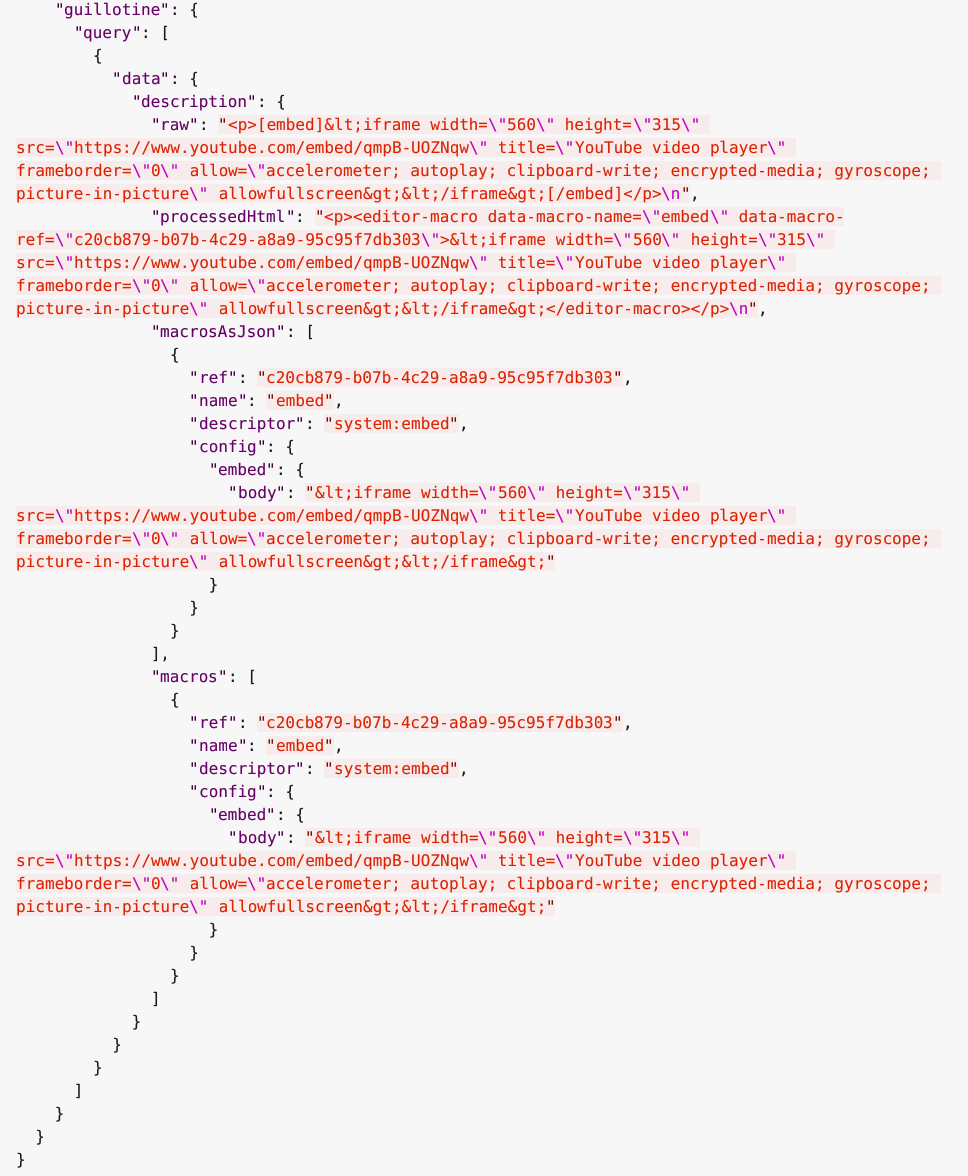
Each macro will be translated to an editor-macro tag with data-macro-ref and data-macro-name attributes in the processedHtml field value. Using these references you will be able to find details of a specific macro in the macrosAsJson or macros fields and implement custom macro processing if needed.
|
Guillotine processes the macros of the applications configured on the site that |
For instance, we have an input form item called description of HtmlArea type which contains the embed macro as shown below:
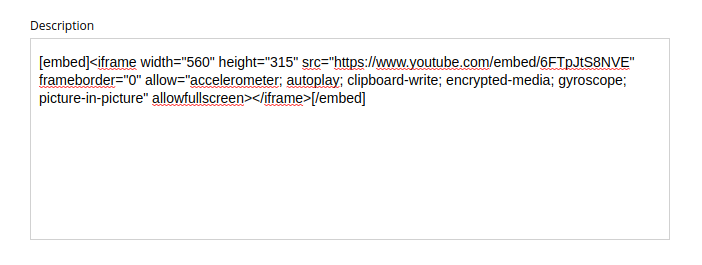
The query below will fetch data for the description field:
query {
  guillotine(project: "myproject", branch: "master") {
    get(key: "/my-site/posts/first-post") {
      ... on com_example_myapp_Post {
        data {
          description {
            raw            (1)
            processedHtml  (2)
            macrosAsJson   (3)
            macros {       (4)
              ref
              name
              descriptor
              config {
                embed {
                  body
                }
              }
            }
          }
        }
      }
    }
  }
}| 1 | Non-processed value of the description field. When raw is the only field selected, the text is not processed |
| 2 | Processed value of the description field |
| 3 | Array of processed macros in JSON format. The order of macros will be the same as in the raw and processedHtml fields. |
| 4 | Macro allows to specify necessary fields. That field is an alternative for macrosAsJson field |
Results of the query:
Custom macros use a macro schema to define their parameters. For example, a testmacro macro with a default_text input is declared at /cms/macros/testmacro/testmacro.yaml, relative to the app resource root. In a Gradle project, this is src/main/resources/cms/macros/testmacro/testmacro.yaml.
kind: Macro
title:
  text: Current user
description:
  text: Shows the currently logged-in user
form:
  - type: TextLine
    name: default_text
    label: Text to show if no user is logged in
In the HtmlArea, the editor stores the macro as its name and parameters, which the raw field returns unchanged:
[testmacro default_text="Please log in"/]In processedHtml, the same macro is replaced by an editor-macro placeholder carrying the name and a reference into the macros list:
<editor-macro data-macro-name="testmacro" data-macro-ref="7a5f2d3e-4c1b-4e8a-9f60-2b1c3d4e5f60"></editor-macro>Select default_text to retrieve the macro parameter defined by this schema:
query {
  guillotine(project: "myproject", branch: "master") {
    get(key: "/my-site/posts/first-post") {
      ... on com_example_myapp_Post {
        data {
          description {
            macros {
              ref
              name
              descriptor
              config {
                testmacro {
                  default_text
                }
              }
            }
          }
        }
      }
    }
  }
}