Repositories
Contents
Introduction
Repositories are the fundamental containers in XP’s data store. Each repository holds a tree of nodes, and every node lives on one or more branches.
A simple comparison: if a repository is a drive, nodes are the files (and folders), and branches are like Git branches that let you stage and promote changes.
You may create any number of repositories within a single instance of Enonic XP, and even perform queries across them. Each repository has a unique name; best practice is to prefix it according to your application, e.g. com.company.myapp.
Repositories can be flagged as transient, meaning their data is not stored in system dumps and snapshots.

Nodes
Each entry in a repository is called a node. Nodes are the smallest possible data object that can be created.
A node consists of:
-
a set of custom properties — the actual data
-
a set of system properties — metadata managed by XP (id, name, path, timestamps, permissions, etc.), prefixed with
_
Nodes are organised in a hierarchy with a path, similar to a file system. Every repository has a root node with the fixed identifier 000-000-000-000 and path /.
A node might look like this:
_id = "a1b2c3d4-e5f6-7890-abcd-ef1234567890"
_name = "oslo"
_path = "/cities/oslo"
_timestamp = "2026-05-21T10:30:00Z"
name = "Oslo"
country = "Norway"
population = 700000
location = geoPoint("59.9139,10.7522")
tags = ["capital", "scandinavia"]
photo = binary("a3f1c8b2e9d4...")
mayor.name = "Anne Lindboe"
mayor.since = localDate("2023-10-25")
Here mayor acts as a container (called a set) that groups related properties.
Properties may also reference binaries — arbitrary blobs such as images, documents, or other files. Binaries are stored alongside the node and inherit the node’s access control, so the same permissions that protect a node’s data also protect its binaries. This is the underlying feature used to store media and attachments in the CMS.
| For the full list of value types, system properties, and indexing options, see the developer documentation. |
Versioning
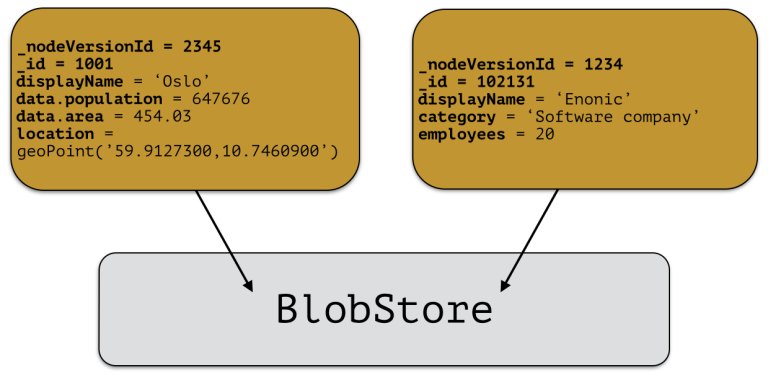
Every modification to a node creates a new node-version with a unique version identifier. A node-version is a snapshot of the node’s properties — it has no knowledge of name, parent, or other tree metadata. Data is persisted in the blobstore and instantly indexed.
This means a node’s full history is preserved automatically, and the same node-version can be referenced from multiple branches.
Branches
Inspired by Git, XP repos support a concept called branches. All repos ship with a default branch called master. The fully qualified location of a node is:
<repo> + <branch> + <node ID | path>
Any number of branches can be added to facilitate your data model. Branches are typically ideal for long-running transactions.
As an example, XP’s CMS API uses two branches — draft and master — to support the editorial workflow with previewing and bulk publishing of changes.
Pushing
XP provides advanced features such as diffing to see the changes between two branches, and a "push" operation that moves changes from one branch to another. The push operation automatically handles dependencies and missing parent items to ensure the result is consistent.
From the CMS API, the push operation is known as "publish".
XP repos currently don’t offer conflict resolution or merging functionality. Conflict resolution must either be handled by the application itself, or the application must write data in a way that avoids creating conflicts.
Example
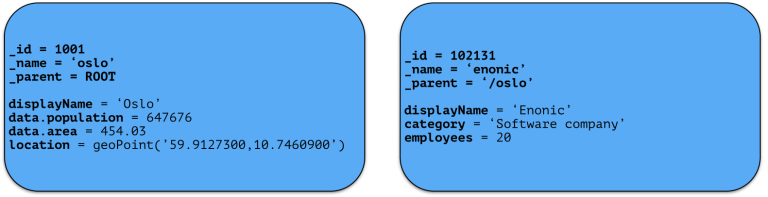
Consider the 'Oslo' and 'Enonic' nodes below:
There will be two node-versions in the repository, with data persisted in both blobstore and search index:
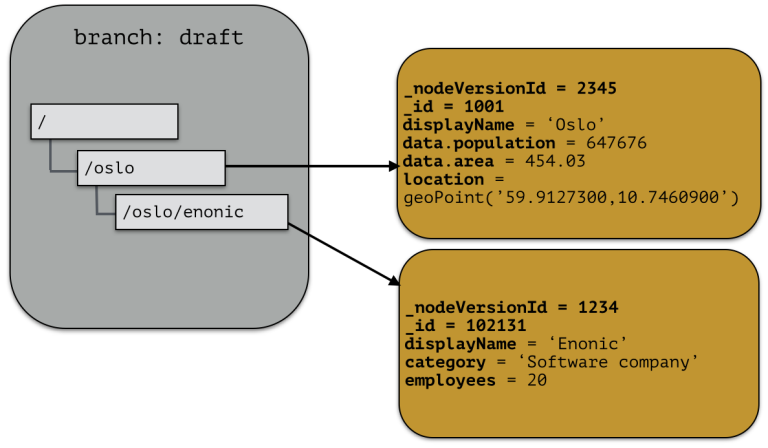
The targeted branch (named 'draft' in this example) gets two entries pointing to the node-versions:
If we push the content of branch 'draft' to the default branch 'master', we end up with something like this:
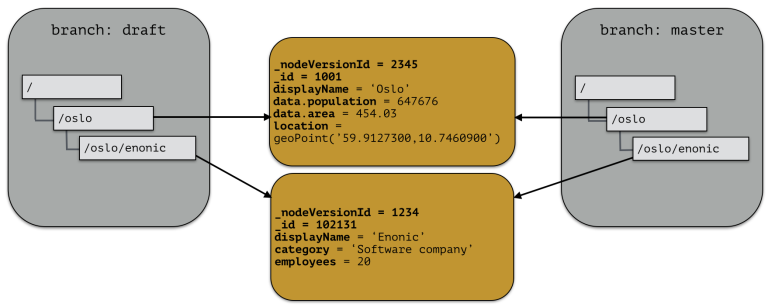
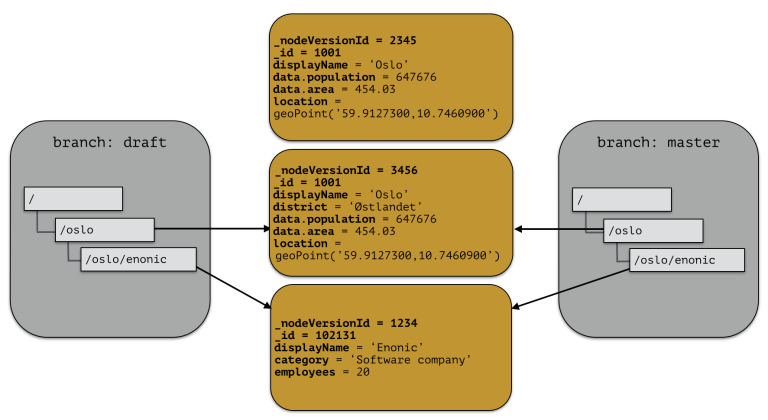
There are now two branches pointing to the same node-versions. A single node-version can exist in several branches with different structures.
If the 'oslo' node is updated and stored to the 'draft' branch, a new node-version is created with the same id and an updated pointer from the branch:
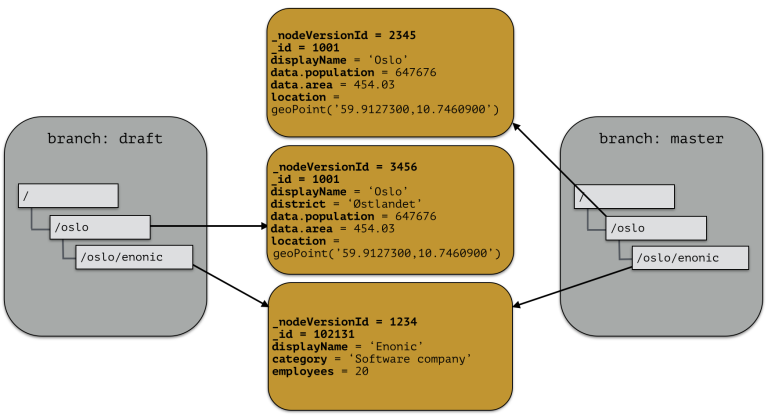
The two branches now point to different node-versions of the 'oslo' node. Doing a push from 'draft' to 'master' results in both branches pointing to the same node-versions again:
System repository
XP ships with a built-in repository known as the system repository. It is used for:
-
Repository metadata — for other repos created within the instance
-
ID providers — including users, groups and roles
-
Application binaries — for apps installed through the API