Release Notes
Contents
The headline features and themes for each XP feature release. For step-by-step upgrade instructions and the full breaking-change list, see Upgrading to XP 8.
XP 8
XP 8 is the largest release in 8 years. The runtime is rebuilt on a modern stack, the Universal API unifies how request handlers are written and called, and a long list of API rough edges has been cleaned up.
Universal API
Web APIs are now first-class citizens of Enonic XP. A uniform implementation pattern can be used to implement and expose APIs across the platform, including direct exposure via the brand new /api service endpoint.
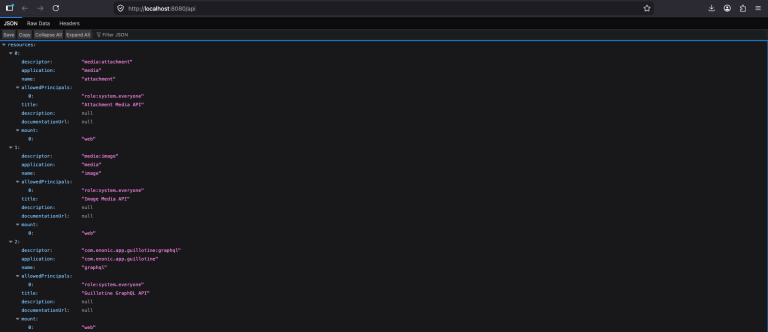
Borrowing the manifest-and-mount pattern from Kubernetes, APIs are registered with a unique name and automatically integrated with the platform’s security and IAM. A matching set of libraries and tools makes it easy to build custom APIs and call them from any context.
APIs can be exposed on custom URLs and domains via virtual host configuration, but also contextually mounted within the admin and site services, allowing for flexible API design and organization.
TODO: Management API?
Modern foundation
The XP 8 core runs on a refreshed stack: Java 25, Jetty 12, and Hazelcast 5.
Prometheus metrics
Metrics are now exposed in the open OpenMetrics format - point your Prometheus, Grafana agent, or any compatible collector at the metrics endpoint to get first-class observability.
XP goes YAML
YAML replaces XML for all CMS schemas and app descriptors. This means content types, application definitions, ID providers, etc., are now all defined in YAML. YAML is a widely adopted format that is easier to read and write than JSON, especially for complex configurations - and it supports comments. The new YAML-based descriptors are more concise and maintainable, making life easier for developers.
Instantly applied permissions
Permissions are now applied instantly across all branches, eliminating the need to publish content just to push permissions through. This means you can manage permissions more efficiently, without worrying about the publishing state of your content. This also applies to the underlying APIs.
Companion apps
The major Enonic apps have been refreshed alongside the platform and are ready for XP 8.
- Content Studio
-
The editorial CMS interface. Migrated to the new Enonic UI design system, and continues to ship as a standalone application so it can release independently of the platform.
- Guillotine
-
Auto-generates a GraphQL API directly from your content model. Updated for XP 8’s runtime and schema changes.
- Data Toolbox
-
The developer-focused tool for inspecting repositories and nodes, and for managing dumps, snapshots, and exports. Updated for XP 8.
Admin Extensions
The Widget API has been replaced by the Extensions API, better reflecting the actual capabilities. Visible tools live in the XP menu, while extensions, you guessed it, extend them - ranging from visual widgets to API-level functionality. The new API is more flexible and powerful.
Additionally, popular extensions such as Content Studio widgets are now wrapped as web components, for complete isolation and flexibility.
TODO: LInk to docs and examples for building admin extensions.
Content and Node API refresh
Years of incremental additions left overlap in the Content and Node APIs. XP 8 cleans them up:
-
moveandrenamecollapse into a singlemove -
setChildOrderandreorderChildrencollapse into a singlesort -
The legacy
hasChildrencontent property is gone -
A new
patchmethod that applies changes across multiple branches in one call -
Language-aware
allTextconfiguration for multilingual full-text indexing -
Removal of the
inheritsPermissionsflag in favour of explicitly applied permissions -
Sort operations also honor language-specific collation.
Vhost context
Vhost configuration files now support declaration of context values - project, branch, principal - co-locating routing decisions with the vhost they belong to. This may also be used to customize application behaviour on a per-vhost basis. See Virtual host context.
Stricter identity validation
Identity keys, content IDs, names, and descriptors now follow consistent, deterministic validation rules: lowercase-only IDs, explicit regex per key type, and length caps that match what the system actually supports. The intent is to eliminate the class of bugs that came from quietly accepting characters that broke serialization, URLs, or filesystem paths downstream. The full ruleset lives in the upgrade notes.
Security hardening
-
Authentication no longer searches for the first matching user across all ID providers. Each request resolves against the vhost’s default ID provider, or the explicitly specified one.
-
New passwords use
pbkdf2-sha512. The legacymd5andsha1hashing algorithms have been retired, including forxp.suPassword.
Smarter dumps and exports
Repositories can now be exported in full or in part - by branch and path - and repositories may be dumped and loaded individually.
Exports and dumps are written directly to ZIP archives, replacing the previous folder-based structure. The plain-file format and dry-run mode have been retired.
Quality of life
A handful of smaller-but-pleasing improvements:
-
Sessions can be persisted to the filesystem via
filestoreMode, surviving graceful restarts on standalone instances -
The admin home moved from
/admin/hometo a cleaner/admin -
HTTP function names now use the standard uppercase form:
GET,POST,PUT,DELETE -
request.localeis available in the request object -
The dump location is configurable via repository config
Breaking changes
For the full list of breaking changes and migration steps, see Breaking changes in the upgrade notes.