Person details component
Contents
In this chapter you’ll create a component to display details of a single person.
Query
Similar to the PersonList component, create a query which will fetch details of a person:
const query = `query PersonQuery($personId: ID!) {
    guillotine(project: "intro", branch: "master", scopeKey: "/") {
        get(key: $personId) {
            _id
            _path
            _name
            displayName
            ... on com_enonic_app_intro_Person {
                data {
                    dateofbirth
                    photos {
                        ... on media_Image {
                            imageUrl(scale: "width(1000)") { path queryString }
                            attachments {
                                name
                            }
                        }
                    }
                    bio(processHtml: { imageSrcWidth: 768, imageWidths: [400, 800, 1200], imageSizes: "(max-width: 800px) 100vw, 800px" }) {
                        processedHtml
                        links {
                            ref
                            uri
                            fragment
                            pageUrl { baseUrl path queryString }
                            media {
                                mediaUrl { path queryString }
                                intent
                                content {
                                    _id
                                }
                            }
                            content {
                                _id
                                _name
                                type
                            }
                        }
                        images {
                            ref
                            src { path queryString }
                            srcset {
                                width
                                imageUrl { path queryString }
                            }
                            image {
                                _id
                            }
                        }
                        macros {
                            ref
                            name
                            descriptor
                            config {
                                factbox {
                                    header
                                }
                            }
                        }
                    }
                }
            }
        }
    }
}`;

export default query;
bio contains Rich Text content, rendered below with the RichText component. |
To test in a GraphQL playground, copy only the query text between the backticks and supply only personId, such as {"personId": "a8b374a2-c532-45eb-9aa1-73d1c37cd681"}, in the query variables. The query selects guillotine(project: "intro", branch: "master", scopeKey: "/") directly.
Styling
This time, we will use css modules to style this component.
Add the following file to your project:
.person,
.person .bio {
    font-family: sans-serif;
}

.person {
    display: flex;
    flex-direction: column;
    padding: 30px
}

.bio {
    line-height: 24px;
}

.bio figcaption {
    font-size: 12px;
}

.photos {
    padding: 0 20px 20px;
    display: grid;
    grid-template-columns: repeat(auto-fit, minmax(200px, 1fr));
    grid-gap: 50px;
    gap: 50px;
}

.photos img {
    width: 100%;
    height: auto; /* Ensures images scale properly */
}

@media screen and (max-width: 720px) {
    .bio figure {
        width: auto !important;
    }
}
Component
Add the Person component:
import type {RichTextData, RichTextMetaData, ContentTypeData, UrlParts} from '@enonic/react-components';
import {RichText} from '@enonic/react-components';
import {useEffect, useState} from 'react';
import {Link as RouterLink, useParams} from 'react-router-dom';
import {mediaUrl} from '../api';
import PERSON_QUERY from '../queries/Person';
import styles from './Person.module.css';


export function Person() {
    const {
        // name,
        personId = ''
    } = useParams();

    const guillotineUrl = import.meta.env.VITE_GUILLOTINE_URL as string;

    const [data, setData] = useState<{
        _name: string
        _path: string
        data: {
            bio: RichTextData
            dateofbirth: string
            photos: {
                imageUrl: UrlParts | null
            }[]
        }
        displayName: string
    }>();

    useEffect(() => {
        fetch(guillotineUrl, {
            body: JSON.stringify({
                query: PERSON_QUERY,
                variables: {
                    personId,
                }
            }),
            headers: {
                'content-type': 'application/json'
            },
            method: 'POST',
        })
            .then(response => response.json())
            .then(json => {
                const value = json.data.guillotine.get;
                setData(value)
            });
    }, [personId]); // useEffect

    if (!data) {
        return null;
    }

    const {
        data: {
            bio,
            photos
        },
        displayName
    } = data;

    // Minimal meta and component data required by RichText
    const meta: RichTextMetaData = {
        type: 'person',
        id: personId,
        path: data._path,
        mode: 'inline'
    };

    const component: ContentTypeData = {
        contentType: 'person',
        type: 'contentType'
    };

    return (
        <>
            <div className={styles.person}>
                <h2>{displayName}</h2>
                <RichText
                    className={styles.bio}
                    data={bio}
                    meta={meta}
                    component={component}
                    tag='article'
                />
                {
                    photos.length && <h4 className={styles.photosheader}>Photos</h4>
                }
                <div className={styles.photos}>
                    {
                        photos.map((photo: any, i: number) => (
                            <img key={i}
                                 src={mediaUrl(photo.imageUrl)}
                                 title={getTitle(photo, displayName)}
                                 alt={getTitle(photo, displayName)}
                                 width="500"
                            />
                        ))
                    }
                </div>
            </div>
            <RouterLink to='/'>Back to list</RouterLink>
        </>
    );
}

function getTitle(photo: any, displayName: string) {
    return (photo.attachments || [])[0].name || displayName;
}
The component fetches directly from import.meta.env.VITE_GUILLOTINE_URL and keeps its response type inline. Gallery images use UrlParts | null for imageUrl and mediaUrl() for their src.
This version uses RichText with its default renderers. Basic HTML is displayed, but Guillotine 9’s internal image and link placeholders are not resolved yet. The next chapter adds custom renderers to resolve those URLs and map person links to the SPA. |
Routing
Finally, App.tsx must be updated to handle the Person component, and trigger it on the following route pattern: /p/:name/:personId.
This means the link should look something like this: /p/name-of-person/id-of-person. Since the ID is unique, we can use this to look up the content in Enonic.
import './App.sass';
import {Route, BrowserRouter as Router, Routes, } from 'react-router-dom';
import {PersonList} from './components/PersonList';
import {Person} from './components/Person';

export default function App() {
  return (
    <Router>
      <Routes>
        <Route path="/" element={<PersonList />}/>
        <Route path="/p/:name/:personId" element={<Person />}/>
      </Routes>
    </Router>
  );
}
Result
To see the Person component in action, open http://localhost:3000 and click any of the persons in the list.
Alternatively, here’s the direct link to Lea Seydough:
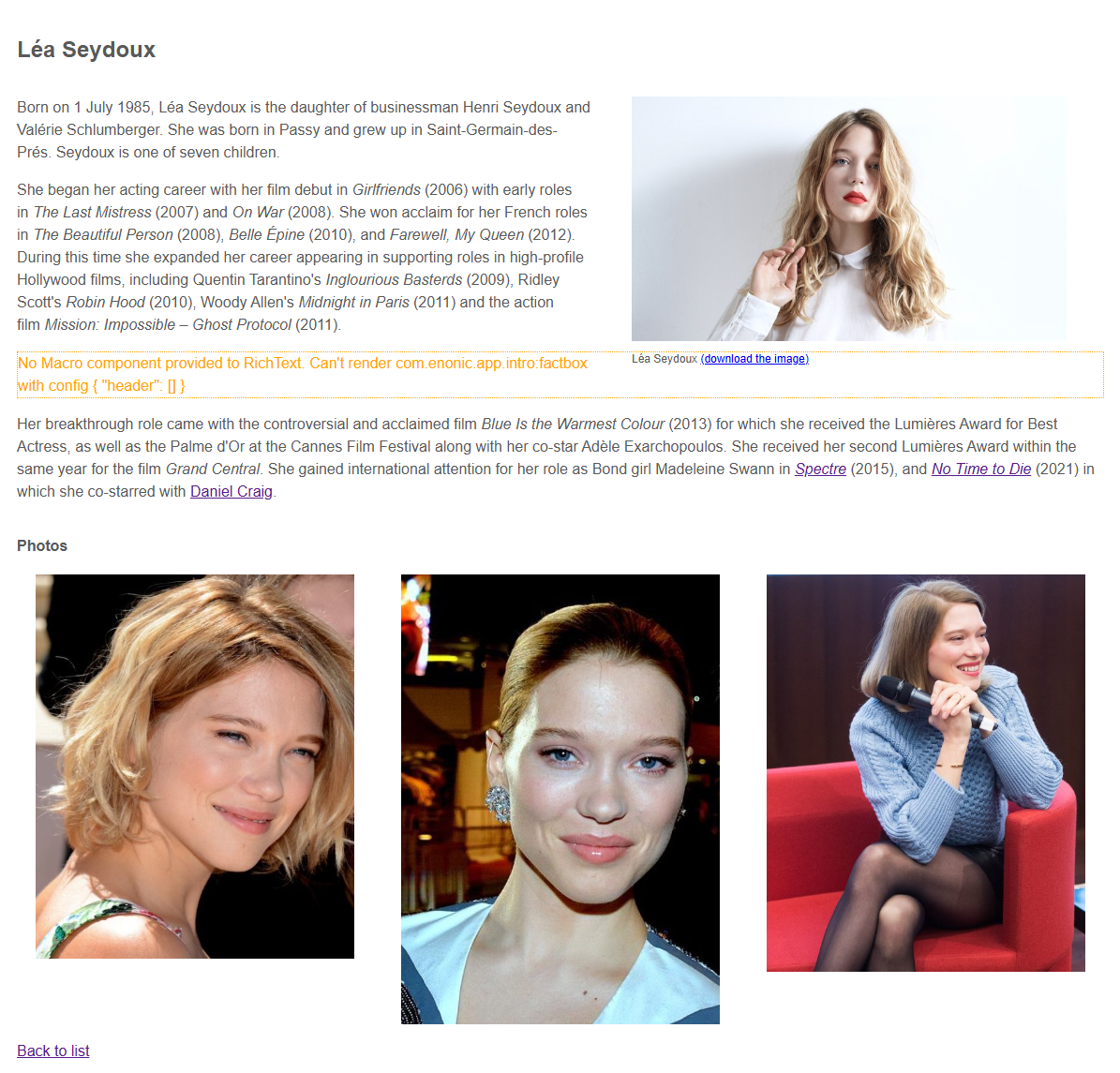
| Screenshots may show older sample names and working image URLs. At this stage, internal biography images and links still need the custom renderers introduced next. |