Person list component
Contents
This chapter covers creation of the PersonList component, including a query for retrieving persons from the Enonic API.
Query
Add the following file to your project (note the new queries folder). The component will use it to fetch data:
const query = `query PersonListQuery {
    guillotine(project: "intro", branch: "master", scopeKey: "/") {
        queryDsl(
            first: 50
            query: {
                term: {
                    field: "type",
                    value: {
                        string: "com.enonic.app.intro:person"
                    }
                }
            }
            sort: {
                field: "modifiedTime",
                direction: DESC
            }
        ) {
            _id
            _name
            displayName
            type
            ... on com_enonic_app_intro_Person {
                data {
                    photos {
                        ... on media_Image {
                            imageUrl(scale: "square(500)") { path queryString }
                        }
                    }
                }
            }
        }
    }
}`;

export default query;
To try this query in a GraphQL playground, copy only the query text between the backticks, not the TypeScript declaration or export. No query variables are needed: the query selects guillotine(project: "intro", branch: "master", scopeKey: "/") directly.
Styling
The component will require some styling, to make it look good! Add the stylesheet for the PersonList component (note the new styles folder):
$gutter: 30px
$color: rgba(0, 0, 0, .5)

ul.person-list
  list-style-type: none
  padding: 30px 30px 0
  margin: 0
  background-color: #444

  li
    display: inline-block
    margin-bottom: $gutter
    padding-right: $gutter
    vertical-align: middle
    width: calc((100% / 3) - 20px)
    &:nth-child(3n)
      padding-right: 0

    a
      display: inline-block
      width: 100%
      position: relative // so div can be centered
      div
        bottom: 10px
        color: #fff
        left: 50%
        font-size: 1.5rem
        opacity: 0
        pointer-events: none
        position: absolute
        text-shadow: 1px 0 0 $color, 0 -1px 0 $color, 0 1px 0 $color, -1px 0 0 $color
        transform: translate(-50%)
        white-space: nowrap
      &:hover
        div
          opacity: 1
      img
        box-shadow: 0 0 10px rgba(0, 0, 0, .1)
        border-radius: 5%
        filter: grayscale(100%)
        height: auto
        margin: auto 0
        transition: all .2s ease-in-out
        width: 100%

        &:hover
          filter: grayscale(0%)
          transform: scale(1.1)
Media URLs
Guillotine 9 returns each photo’s imageUrl as URL parts (path and queryString), not a URL string. Before adding the component, create src/api.ts to construct browser URLs:
import type {UrlValue} from '@enonic/react-components';

const endpoint = import.meta.env.VITE_GUILLOTINE_URL || '/api/com.enonic.app.guillotine:graphql';
const mediaRoot = (import.meta.env.VITE_ENONIC_MEDIA_URL
    || (endpoint.startsWith('/') ? endpoint.slice(0, endpoint.lastIndexOf('/')) : new URL('.', endpoint).href))
    .replace(/\/+$/, '');

export function mediaUrl(value?: UrlValue | null): string | undefined {
    if (typeof value === 'string') {
        return value;
    }
    return value ? mediaRoot + value.path + (value.queryString || '') : undefined;
}
This module exports only mediaUrl(value?: UrlValue | null). It uses the optional VITE_ENONIC_MEDIA_URL, or derives the media API root from VITE_GUILLOTINE_URL with new URL('.', endpoint).
Component
Add the React component (note the new components folder). It fetches directly from import.meta.env.VITE_GUILLOTINE_URL and keeps its response type inline, with imageUrl typed as UrlParts | null. mediaUrl() constructs the image source:
import {useEffect, useState,} from 'react';
import {Link} from 'react-router-dom';

import '../styles/PersonList.sass';

import {mediaUrl} from '../api';
import type {UrlParts} from '@enonic/react-components';

import PERSON_LIST_QUERY from '../queries/PersonList';

const forceArray = (data: any) => (Array.isArray(data) ? data : [data]);

export function PersonList() {
  const [data, setData] = useState<{
    _id: string
    _name: string
    data: {
      photos: {
        imageUrl: UrlParts | null
      }[]
    }
    displayName: string
  }[]>();

  useEffect(() => {
    fetch(import.meta.env.VITE_GUILLOTINE_URL as string, {
      body: JSON.stringify({
        query: PERSON_LIST_QUERY,
      }),
      headers: {
        'content-type': 'application/json',
      },
      method: 'POST',
    })
        .then(response => response.json())
        .then(json => setData(json.data.guillotine.queryDsl));
  }, []);

  return (
      <>
        {data && <ul className='person-list'>
          {data.map((person, i) => {

            const {
              _id,
              _name,
              data: {
                photos
              },
              displayName
            } = person;

            const imgProps = {
              alt: displayName,
              src: mediaUrl(photos ? forceArray(photos)[0].imageUrl : undefined),
            };

            return <li key={i}>
              <Link to={`/p/${_name}/${_id}`}>
                <img {...imgProps}/>
                <div>{displayName}</div>
              </Link>
            </li>;
          })}
        </ul>}
      </>
  );
}
Routing
Finally, update the App.tsx file to include the PersonList component and display it on the root path /:
import './App.sass';
import {Route, BrowserRouter as Router, Routes} from 'react-router-dom';
import {PersonList} from './components/PersonList';

export default function App() {
  return (
    <Router>
      <Routes>
        <Route path="/" element={<PersonList />}/>
      </Routes>
    </Router>
  );
}
Result
With everything in place, you should now see a grid of person images at http://localhost:3000.
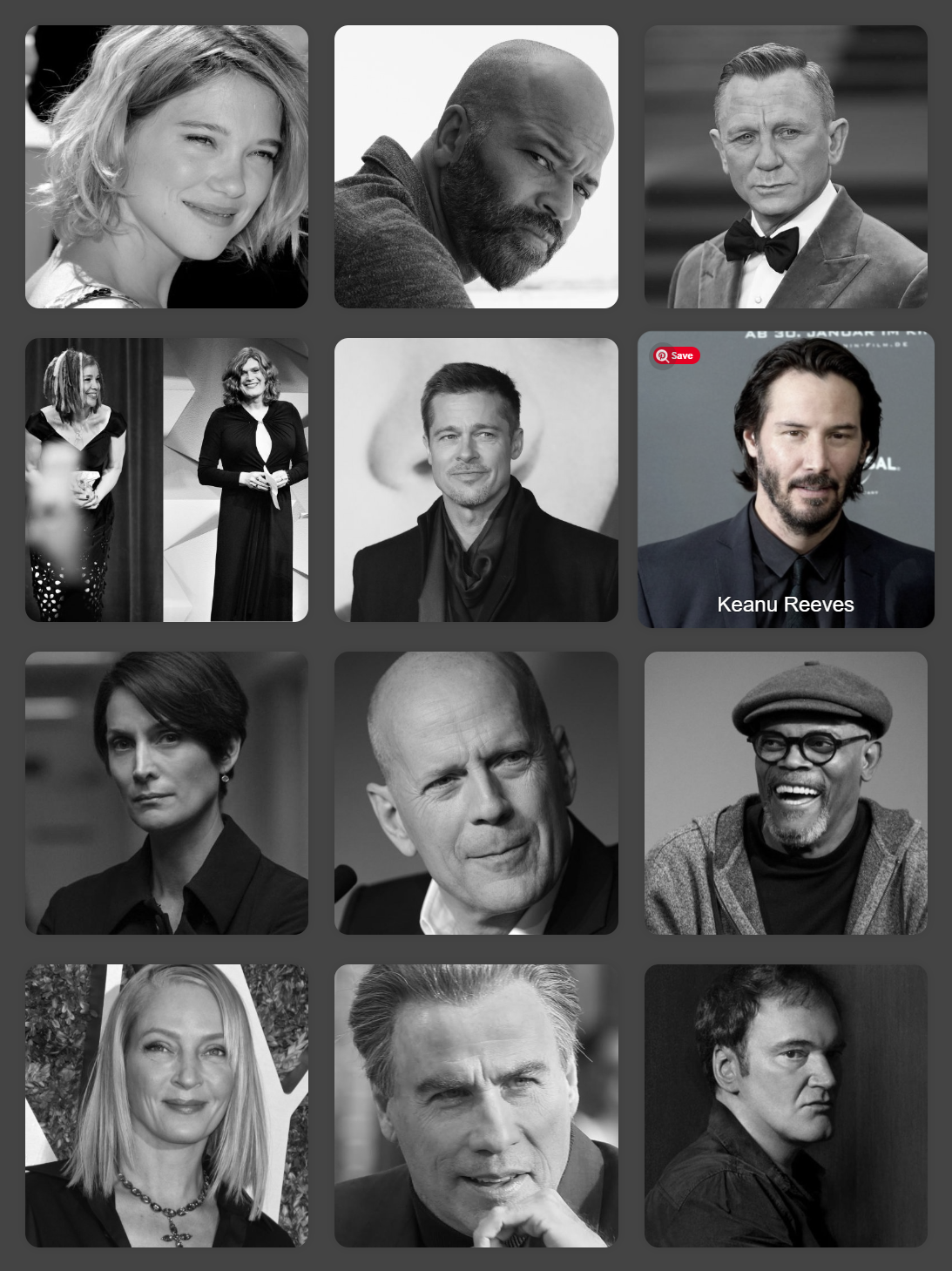
Clicking any of the images will take you to the person’s detail page - which is yet to be implemented.
Next step
Moving forward, you’ll create a component and a matching routing to render Person details.