Go online
Contents
In this chapter, you’ll publish the Hello World site, making it available outside Content Studio.
Publishing
In Content Studio, you work in the draft branch. Publishing merges the selected items from draft to the master branch, which is the one visitors see.
Task: Publish the site
-
Select the site - Select the
Hello Worldsite in the content grid. -
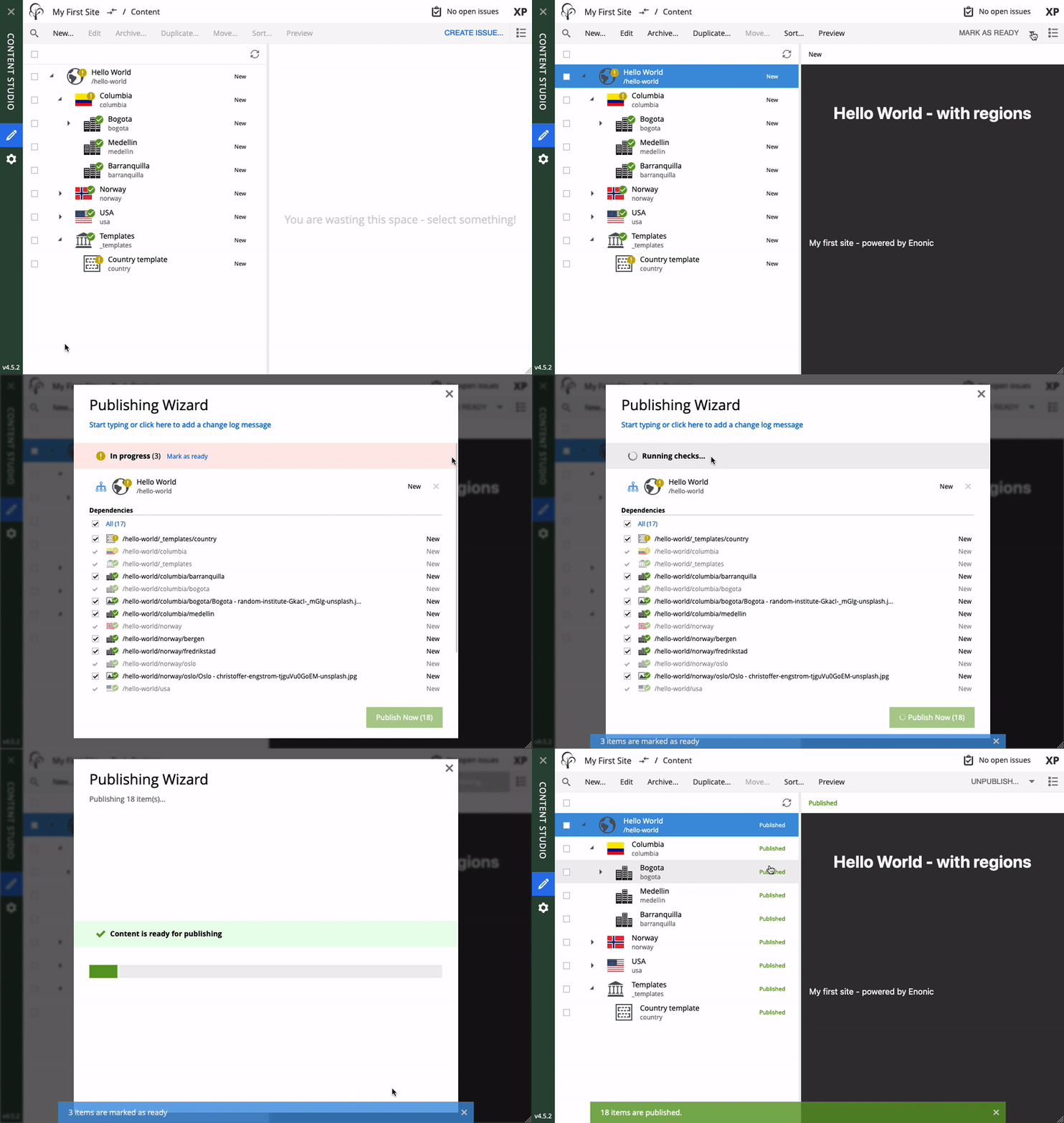
Open the Publishing Wizard - Select Publish Tree in the action menu in the top right corner. The Publishing Wizard opens.
-
Mark the content as ready - Items that are
In progressblock publishing. Click Mark as ready to fix this. -
Publish - Click Publish:
-
Verify the published site - Open http://localhost:8080/site/myfirstsite/master/hello-world in your browser. It shows the site as served from the
masterbranch.
Summary
You did it! 🎉 You’ve built a site with the Enonic Site Framework: pages, parts, and layouts that render structured content, composed and published from Content Studio.
That completes the tutorial. If you want to keep going, these are good places to continue:
-
The content modeling tutorial goes deeper into structured content and the GraphQL API.
-
The front-end frameworks overview presents the other ways to build a front-end for Enonic.