Visualize your content with pages
Contents
In this chapter, you’ll get to know the page component that ships with your app - its descriptor, controller, and view - and use it to render the site.
Page component
At this point, you have content, but nothing renders it. With the Enonic Site Framework, XP renders the content itself. A page is composed of one or more components, always with a page component as its root.
Your app includes a page component named hello. A component is defined by a descriptor file, placed in a particular location within your app. For page components, that is src/main/resources/site/pages/:
<?xml version="1.0" encoding="UTF-8" standalone="yes"?>
<page>
  <display-name>Hello Page Controller</display-name>
  <form/>
</page>| Like content types, components can define a form using the schema system. You’ll see an example in the parts chapter. |
Controller
Each component can have its own controller, which is responsible for rendering it. This is the controller of the hello page component:
import type { Response } from '/index.d';

// @ts-expect-error no-types
import {render} from '/lib/thymeleaf';
import {getContent} from '/lib/xp/portal';

// Specify the view file to use
const VIEW = resolve('./hello.html');

// Handle the GET request
export function get(): Response {

    // Get the content that is using the page
	const content = getContent();

	// Prepare the model that will be passed to the view
	const model = {
		displayName: content.displayName
	}

	// Prepare the response object
	const response: Response = {
		body: render(VIEW, model)
	};

	return response;
}| The controller file must be placed in the component directory and use the same name as the directory. |
The controller is written in TypeScript. The build system compiles each .ts file and places the generated .js file in the same location. XP picks up and invokes the resulting .js file.
View
The controller passes its model to an HTML template - the view in the Model View Controller (MVC) pattern:
<!DOCTYPE html>
<html>
    <head>
        <title data-th-text="${displayName}">Sample title</title>
    </head>
    <body>
        <h1 data-th-text="${displayName} + ' - we made it!'">Sample header</h1>
    </body>
</html>
The view is plain HTML, extended with attributes from the Thymeleaf templating language. Other template engines are available as libraries, such as Mustache and Freemarker.
Task: Create your first page
For the hello page component to render something, a content item must use it.
-
Open the site - In Content Studio, select the
Hello Worldsite and click Edit. -
Select the page component - In the preview panel on the right-hand side, select
Hello Page Controllerin the list. Your changes are saved automatically. -
Verify the rendering - The preview shows the display name of the site, followed by the text
- we made it!: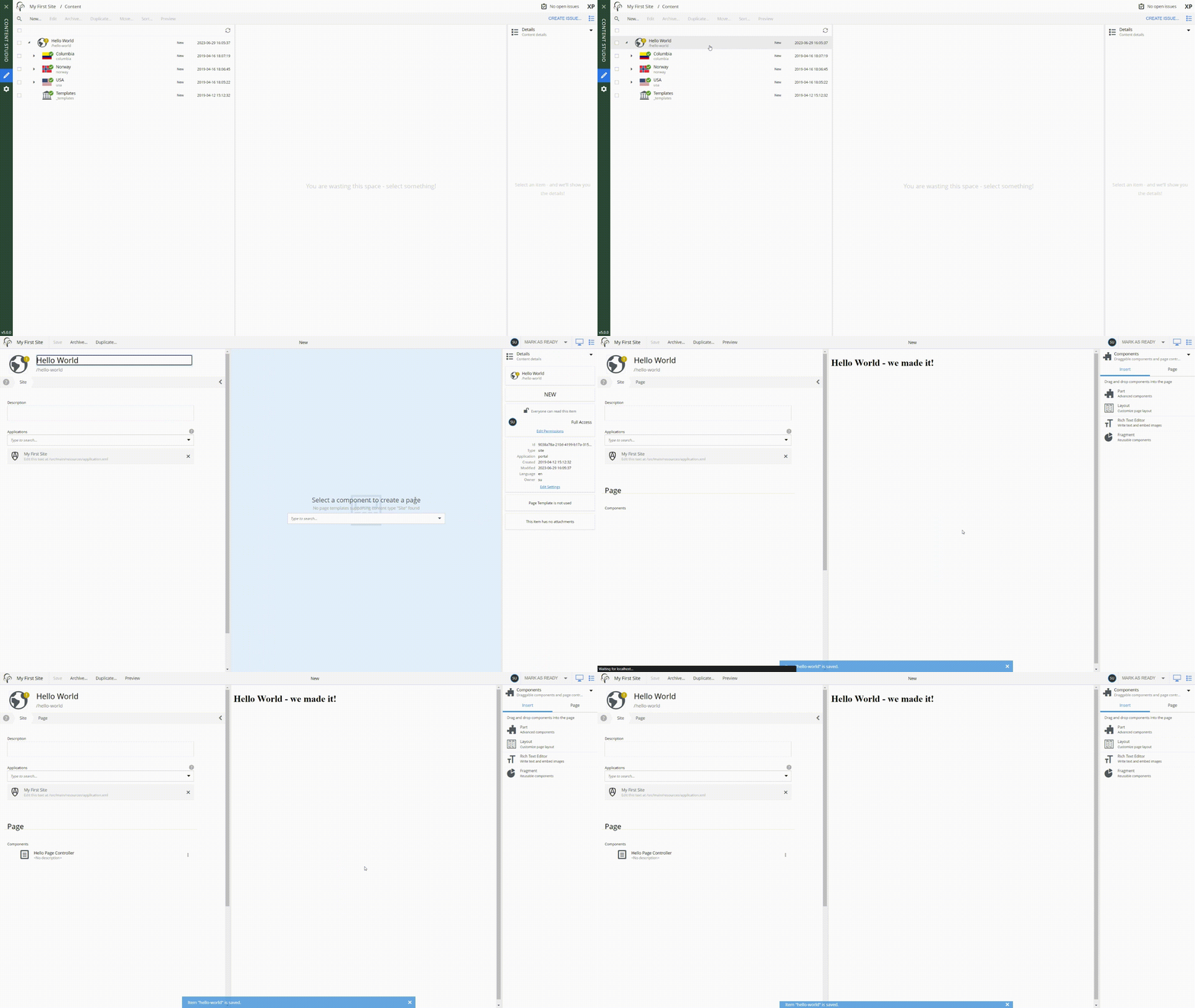
Summary
You’ve seen how a page component consists of a descriptor, a controller, and a view, and used it to render the Hello World site. The page isn’t entirely static: the controller reads the display name of the content and passes it to the view, which adds a hardcoded text.
| To learn more about pages, visit the pages documentation. |
Next, you’ll add a region to the page, so more components can be placed on it.