Headless API
Contents
In this chapter, you’ll query your artists through Guillotine, Enonic’s GraphQL API, and see how changes to your content model appear in the API.
Guillotine
Guillotine generates a GraphQL API from your content types, letting you query both common content fields and the fields you define in YAML.
It was installed with the Essentials sandbox template. You’ll explore it through Content Studio’s Query Playground.
This tutorial is written for Guillotine 9, which requires XP 8.1 or newer. Check the version in XP menu → Applications if your queries do not behave as described. |
Query Playground
Back in Content Studio, click the GraphQL icon in the menu bar on the left to open Query Playground:
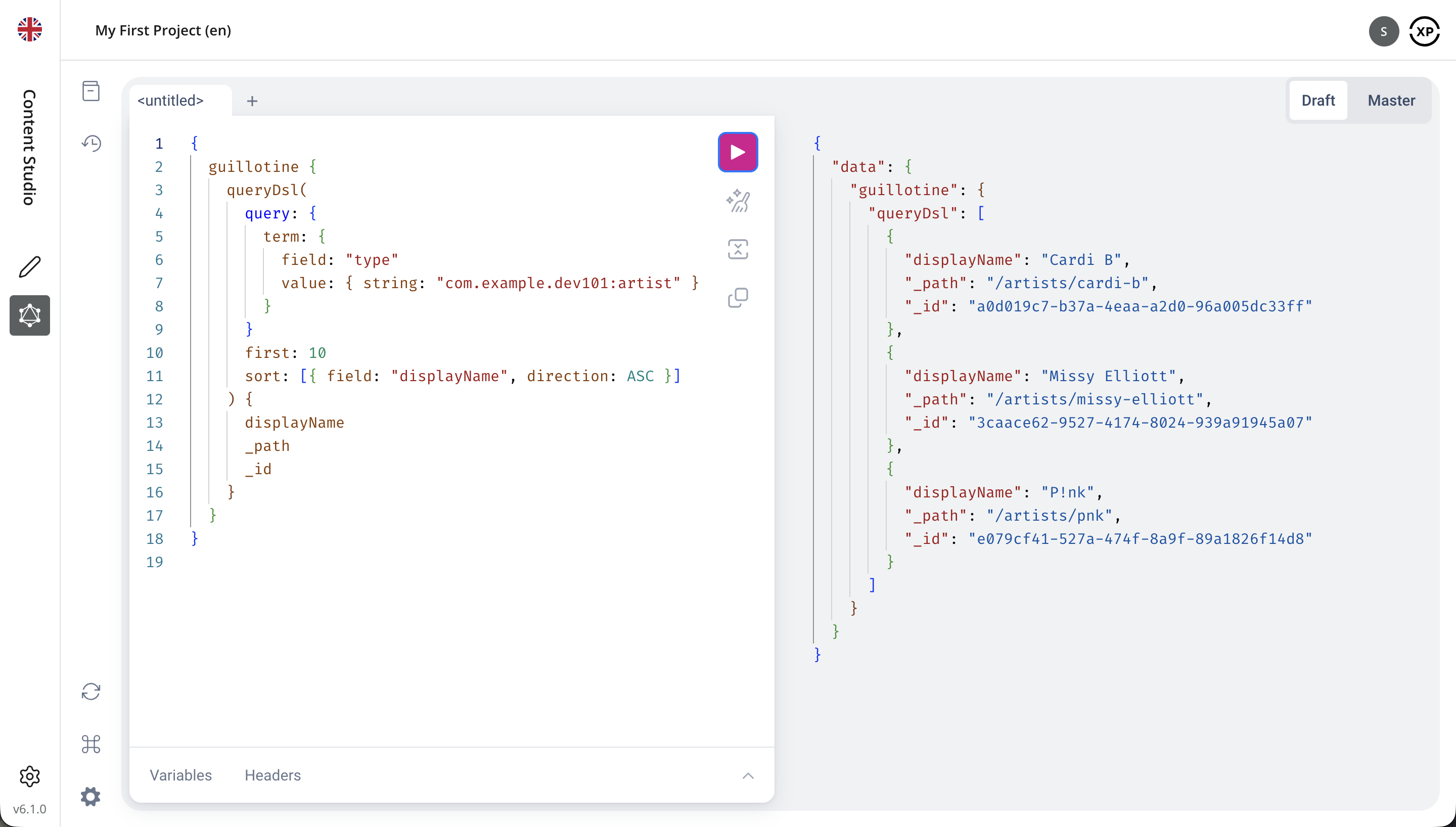
Query Playground is an interactive GraphQL API explorer. You enter your query in the editor in the middle and when you execute it, you’ll get the results of the query in the panel on the right.
GraphQL lets you request exactly the fields you need from an API. The official GraphQL documentation explains the query language in more detail.
Select your "My First Project" project and the Draft branch in Query Playground. Keep Draft selected throughout this chapter so your queries include the changes you make in Content Studio.
Task: Query your artists
Use queryDsl to find content by its type.
-
Find artists by content type - Run this query to retrieve up to ten artists, sorted by display name:
{
  guillotine {
    queryDsl(
      query: {
        term: {
          field: "type"
          value: { string: "com.example.dev101:artist" }
        }
      }
      first: 10
      sort: [{ field: "displayName", direction: ASC }]
    ) {
      displayName
      _path
      _id
    }
  }
}
You should get Cardi B, Missy Elliott and P!nk in the response panel, in that order. The response has this structure, with the results in the
data.guillotine.queryDslarray. Your content IDs will differ from these example values, and the paths depend on the names you gave your items:Example response{ "data": { "guillotine": { "queryDsl": [ { "displayName": "Cardi B", "_path": "/artists/cardi-b", "_id": "a0d019c7-b37a-4eaa-a2d0-96a005dc33ff" }, { "displayName": "Missy Elliott", "_path": "/artists/missy-elliott", "_id": "3caace62-9527-4174-8024-939a91945a07" }, { "displayName": "P!nk", "_path": "/artists/pnk", "_id": "e079cf41-527a-474f-8a9f-89a1826f14d8" } ] } } } -
Try sorting and limiting results - Change
firstto1anddirectiontoDESC, then run the query again. You should get only P!nk, the last artist alphabetically. -
Return to the query defaults - Remove the
firstandsortarguments before continuing. Withoutfirst,queryDslreturns up to ten results; withoutsort, it uses relevance order. The remaining examples use these defaults, so results may appear in a different order from the sample responses.
The term matches the full content type name, including your app’s namespace. The Artists folder keeps your content organized, but this query finds artists anywhere in the selected content project. first limits the number of results, and sort puts them in alphabetical order.
Getting around
Before trying to come up with complex queries, let’s familiarize ourselves with Query Playground. It consists of a few panels:
- Docs
-
Opens on the left, and lets you browse every type and field in the API. We’ll use it in a moment.
- Query
-
The editor in the middle, where you write your query. Press the play button, or ctrl+enter, to run it.
- Response
-
The panel on the right, showing the result of the query, or any errors.
- Variables
-
Expands below the query editor, and lets you supply query variables as a JSON object.
- Draft / Master
-
The buttons above the response panel select which branch to query. Draft is your work in progress, Master is what has been published.
Queries run in the project currently selected in Content Studio’s top bar, so you never have to tell Query Playground which project to use.
Task: Explore the GraphQL types
The YAML content type schema you wrote defines the Artist form and its data in the CMS. Guillotine uses that definition to generate GraphQL types for querying your artists. These types are part of the GraphQL schema: the API’s description of the types, fields and operations available to query. The GraphQL documentation explains schemas and types in more detail.
-
Find the Artist GraphQL type - Open the Docs panel to explore those types. Search for
artistand locate the{app-name-query}_Artistobject type: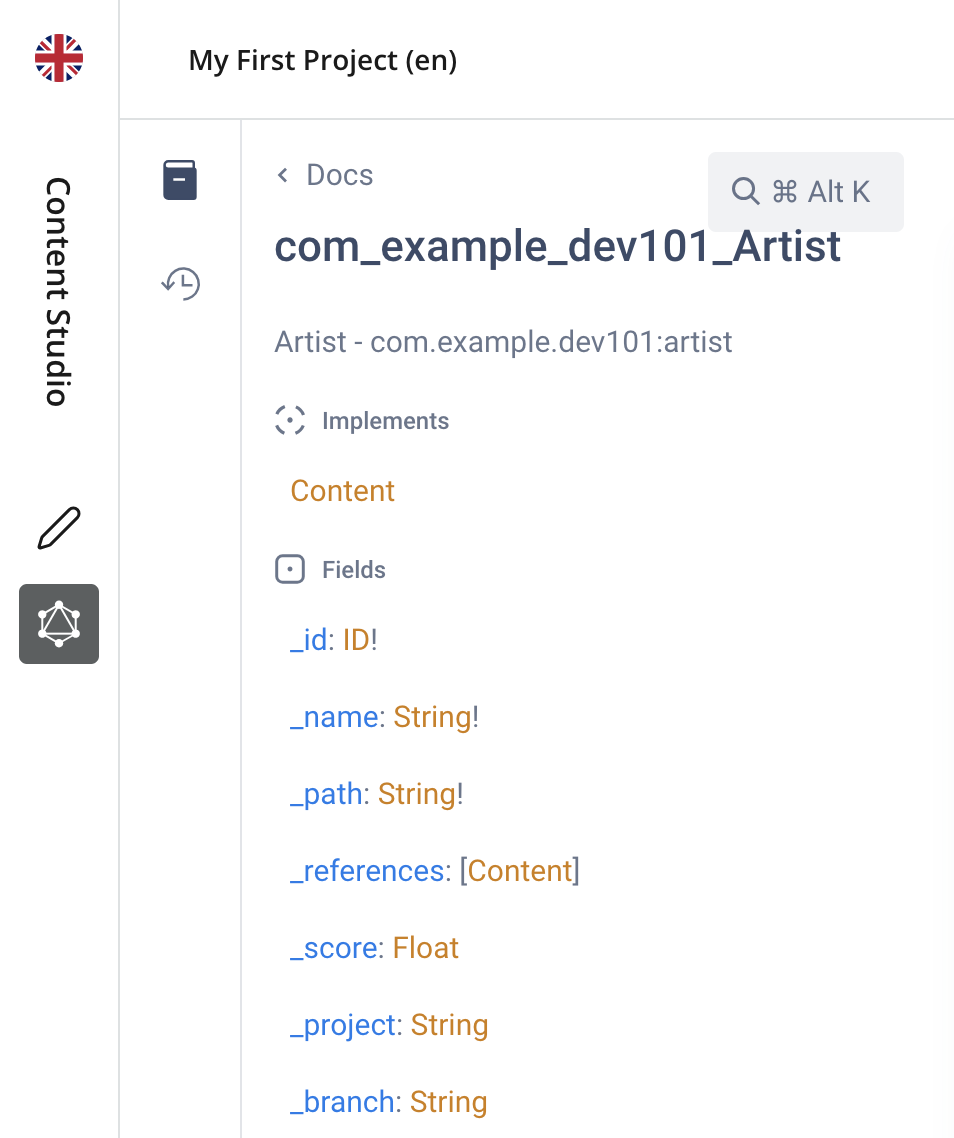 Figure 1. The Artist GraphQL type
 -
Find the form fields - Follow the Artist object type’s
datafield to{app-name-query}_Artist_Datain the Docs panel and findlegalNameandabout. These are the fields you defined in your YAML form.
Notice that the Artist object type implements the Content interface. An interface defines fields shared by the object types that implement it. Here, Content defines common content fields such as displayName, _path and _id, so you can request them for any content item.
Your CMS content type is named com.example.dev101:artist, and its generated GraphQL object type is {app-name-query}_Artist. The app namespace carries over to the API, keeping the types from different apps apart. |
Task: Select the Artist fields
You’ve inspected the Artist GraphQL type in the Docs panel. Now you’ll query the fields from your content type’s form.
-
Prepare the result selection - Close the Docs panel, head back to the editor and remove
displayName,_pathand_idfrom the query we introduced earlier. -
Explore the available fields - Put your cursor inside the result selection braces immediately after
queryDsl(…), and press ctrl+space to see which fields you can request. Look for the common fieldsdisplayName,_pathand_idin the suggestions. -
Query the Artist fields - Run this query with an inline fragment to access the Artist’s
datafields:{ guillotine { queryDsl( query: { term: { field: "type" value: { string: "com.example.dev101:artist" } } } ) { ... on com_example_dev101_Artist { _id data { legalName about } } } } }
The autocomplete suggestions omit legalName and about because those fields belong to the Artist’s data type. queryDsl returns the general Content interface, even when its filter selects only artists. The filter controls which items match; it does not change the query field’s declared GraphQL return type. To select the Artist type’s own fields, use an inline fragment. The syntax ... on {app-name-query}_Artist { ... } means "for results whose GraphQL type is Artist, select the fields inside this block."
The filter selects artists, and the inline fragment lets you request their legalName and about fields under data, along with the general content field _id. Below is one example item from the data.guillotine.queryDsl array. The field values depend on what you entered in Content Studio:
{
  "_id": "a0d019c7-b37a-4eaa-a2d0-96a005dc33ff",
  "data": {
    "legalName": "Belcalis Marlenis Almánzar",
    "about": "Belcalis Marlenis Almánzar (born October 11, 1992), known professionally as Cardi B, is an American rapper and songwriter."
  }
}
Task: Retrieve one artist
When you know an item’s path or ID, use get to retrieve it directly.
-
Fetch an artist by path - Copy Cardi B’s
_pathfrom the first response and use it as thekeybelow:{ guillotine { get(key: "/artists/cardi-b") { displayName ... on com_example_dev101_Artist { data { legalName about } } } } } -
Fetch the same artist by ID - Replace the path with Cardi B’s
_idfrom your first response and run the query again. Both keys retrieve the same item.
An ID stays the same when an item is renamed or moved; its path changes. If the key does not match an item in the selected project and branch, get returns null.
The result is one object under data.guillotine.get, rather than an array of results. Like queryDsl, get returns the Content interface, so you use an inline fragment to select the Artist fields.
Task: Inspect the form data
For a quick look at all stored form data, use dataAsJson.
-
Fetch the stored form data - Update the single-artist query to:
{
  guillotine {
    get(key: "/artists/cardi-b") {
      displayName
      dataAsJson
    }
  }
}
This returns all stored form fields without selecting them individually. At this point, your Artist form has only legalName and about. The object under data.guillotine.get looks like this, with the values you entered in Content Studio:
{
  "displayName": "Cardi B",
  "dataAsJson": {
    "legalName": "Belcalis Marlenis Almánzar",
    "about": "Belcalis Marlenis Almánzar (born October 11, 1992), known professionally as Cardi B, is an American rapper and songwriter."
  }
}
Use dataAsJson to inspect stored values. Use typed fields when you want to select specific fields or follow references, which you’ll try in a later chapter.
Search your content
The queryDsl field also supports text searches. The "Dsl" stands for "Domain Specific Language": the structured query you pass to it describes which content to find.
Task: Find artists by their description
-
Search the artist descriptions - Keep the Artist type filter and add a text search on
data.about:{ guillotine { queryDsl( query: { boolean: { must: [ { term: { field: "type" value: { string: "com.example.dev101:artist" } } } { ngram: { fields: ["data.about"] query: "rap" } } ] } } ) { displayName ... on com_example_dev101_Artist { data { about } } } } }
The boolean.must list requires both conditions to match: the item must be an Artist, and its about text must match rap. The ngram expression finds partial words, so it can match "rapper". With the example descriptions, you should get Cardi B and Missy Elliott. The query returns each description so you can see why it matched.
If your descriptions use different words, change rap to part of a word you entered, or edit a description in Content Studio, save it and run the query again. The Query DSL reference covers more search expressions and combinations.
Extend the content model
Adding a form field also makes it available through GraphQL. You’ll add a birthday to the Artist content type and read it back through the API.
Task: Add and query birthdays
-
Add the birthday field - Update the Artist content type:
src/main/resources/cms/content-types/artist/artist.yamlkind: "ContentType" title: "Artist" description: "Information about an artist" displayNamePlaceholder: "Stage name" superType: "base:structured" form: - type: "TextLine" name: "legalName" label: "Legal name" helpText: "The artist's name on official documents, if different from their stage name." - type: "TextArea" name: "about" label: "About the artist" - type: "Date" name: "birthday" label: "Birthday"The new
birthdayfield uses the Date form item. Save the file whileenonic devis running, as in the previous chapter, and wait for the app to redeploy. -
Enter the birthdays - Open each artist in Content Studio, enter the birthday below and save:
-
Cardi B:
1992-10-11 -
Missy Elliott:
1971-07-01 -
P!nk:
1979-09-08
-
-
Reload the GraphQL schema - Close and reopen Query Playground to reload the GraphQL schema. Keep the Draft branch selected: these edits have not been published. Find
{app-name-query}_Artist_Datain the Docs panel and notice its newbirthdayfield. -
Query the birthdays - Run the artist query with
birthdayselected:{ guillotine { queryDsl( query: { term: { field: "type" value: { string: "com.example.dev101:artist" } } } ) { displayName ... on com_example_dev101_Artist { data { birthday } } } } }The
data.guillotine.queryDslarray now contains:Artists with birthdays[ { "displayName": "Cardi B", "data": { "birthday": "1992-10-11" } }, { "displayName": "Missy Elliott", "data": { "birthday": "1971-07-01" } }, { "displayName": "P!nk", "data": { "birthday": "1979-09-08" } } ]
You changed the CMS schema and entered content; Guillotine made the new field available without any API code.
Other clients
From outside Content Studio, send these same queries to http://localhost:8080/api/com.enonic.app.guillotine:graphql. This endpoint is shared by all content projects. An external client must specify the content project and branch, and authenticate to read drafts; Query Playground supplies that context for you.
For example, the single-artist query with explicit project and branch arguments looks like this:
{
  guillotine(project: "my-first-project", branch: "draft") {
    get(key: "/artists/cardi-b") {
      displayName
    }
  }
}
The project argument is the content project’s identifier, my-first-project, rather than its display name, "My First Project". Setting branch: "draft" selects unpublished work; it does not authenticate the request. Use branch: "master" to read published content.
Guillotine is a Universal API, served at /api/<app>:<name>. Its API name, com.enonic.app.guillotine:graphql, follows the API base URL, http://localhost:8080/api on your sandbox. The media APIs you’ll use in the next chapter follow the same pattern.
For browser requests from another origin, the server must allow that origin through CORS. The Guillotine documentation covers cURL requests, third-party GraphQL clients and CORS configuration for browsers. For a complete JavaScript request, see the Guillotine usage examples.
Dive deeper
-
For more query examples and information about how to get up and running with Guillotine, check out the Guillotine docs
-
For pagination and aggregations, see the queryDslConnection reference.
-
If you want to learn more about GraphQL in general, the Introduction to GraphQL documentation is a good place to start
Coming up
You’ve found artists by type, selected their fields, retrieved a single item, searched descriptions and queried a new field from your content model. In the next chapter, you’ll see how XP deals with files and images.