Page Fragments
Contents
Page Fragments enable reuse of components across different pages.
Introduction
A page fragment is a content item of type portal:fragment. It represents a reusable page component. A content of this type contains a page component (Part or Layout) that can be re-used in other pages, but it only needs to be maintained in one place.
Usage
To create a Fragment in Content Studio: Edit an existing page, select a component and click "Create Fragment". Once created, the fragment content can be referenced in other pages by inserting a Fragment component in the page.
Changes applied to a fragment will immediately be available in the pages that reference the fragment.
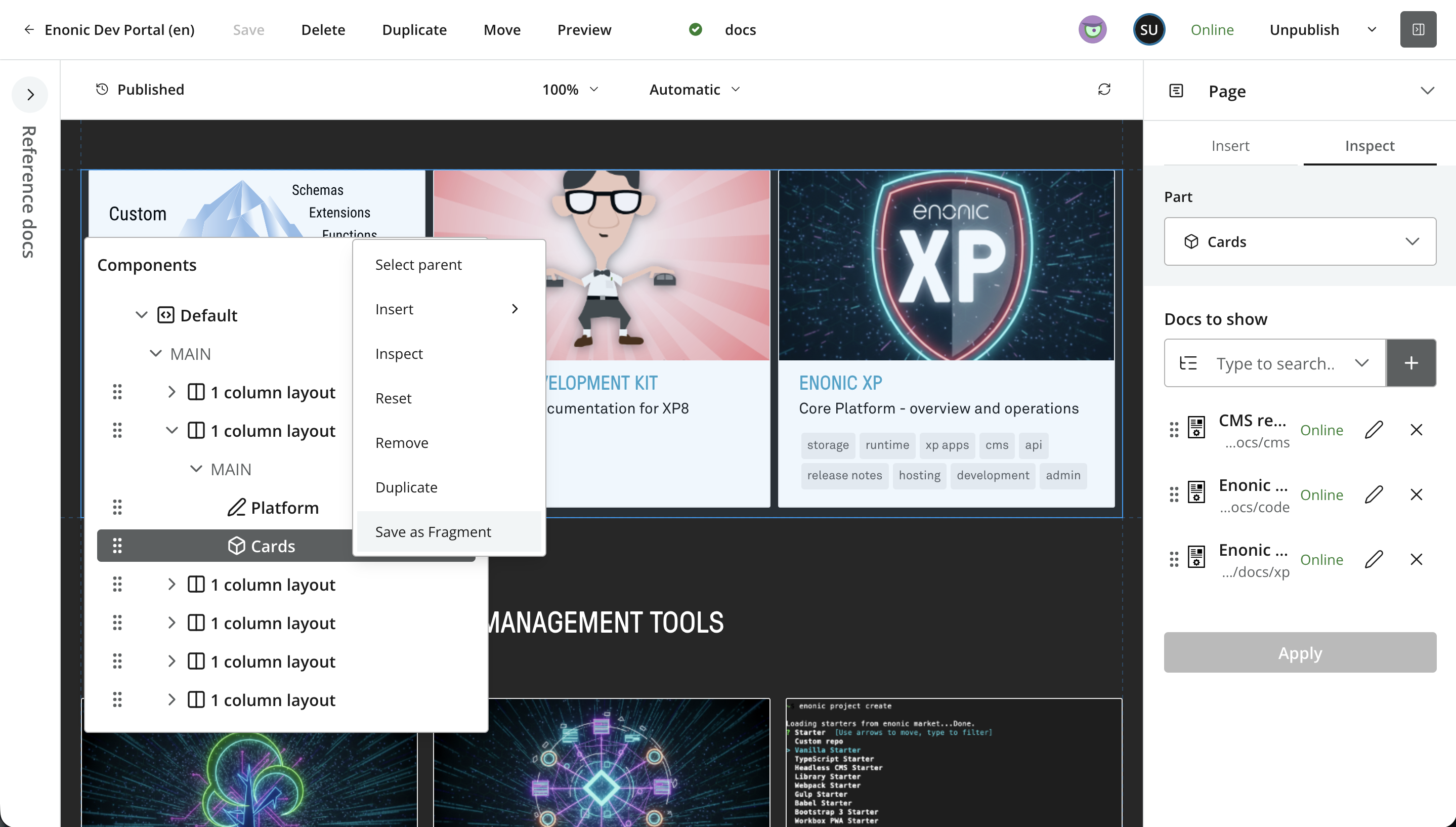
Once a fragments is created, it can be inserted on pages just like any other component. Using Content Studio, simply insert a fragment placeholder, and choose the fragment content item from the list.
Preview
Fragments can be edited and managed from the content form panel, without any visual editing or preview enabled.
If your front-end has implemented a preview route for fragments, you can also preview the rendered fragment in isolation. To do this, fetch the fragment content item via GraphQL and render the wrapped component as you would for a page. See Direct access for the query.
Enonic’s built-in rendering supports fragment preview via mapping using <match>type:'portal:fragment'</match>. |
Search
Fragments are separate content items, and their text content is indexed on the fragment — not on the pages that reference it. The practical implications are important:
-
A full-text query for a word that appears inside a fragment will match the fragment itself, but not the pages where that fragment is embedded.
-
A customer-facing site search will therefore miss relevant pages whenever their visible text lives in shared fragments. It may also surface bare fragment hits that are not meant to be user-reachable.
Exclude portal:fragment from customer-facing queries to avoid surfacing orphan fragment hits. |
De-normalized site search
When you need a true site search — where a hit points to the page a user would actually land on, regardless of whether the matching text came from the page, a fragment, or a referenced content item — build a separate, de-normalized search index. Enonic’s Explorer app is purpose-built for this: it crawls your rendered site (or API output) and produces a search index where each document represents a page with its fully resolved content.
This is a general pattern, not a fragment-specific one — the same caveat applies to any headless content composition where multiple content items are stitched together at render time.
Definition (portal:fragment)
The Fragment content type has the following defiinition:
- super-type
-
base:structured
- is-abstract
-
false
- is-final
-
true
- allow-child-content
-
true
Querying via GraphQL
Fragments are consumed in two very different ways:
-
Indirectly, via a page that references them — the normal case. The front-end fetches a page and fragment references are expanded inline so the rendered output does not need to know a component came from a fragment.
-
Directly, by fetching the fragment content item — mainly for preview routes and editorial interfaces that render or edit a single fragment in isolation. Customer-facing code should almost never fetch fragments directly.
Inline resolution via a page
When fetching a page’s flat component list, Guillotine supports server-side fragment expansion via the resolveFragment argument on components. With resolveFragment: true, each fragment reference is replaced by the component it wraps, and the FragmentComponent wrapper is never emitted:
{
  guillotine {
    get(key: "/site/articles/hello") {
      components(resolveFragment: true) {
        type
        path
        ... on PartComponent {
          descriptor
          configAsJson
        }
        ... on LayoutComponent {
          descriptor
        }
        ... on TextComponent {
          value
        }
      }
    }
  }
}
This is the simplest integration when the front-end does not need to distinguish fragment-sourced components from direct ones.
Manual traversal
When fragments may be nested — a fragment whose wrapped layout contains another fragment — or when the front-end wants to tag fragment-sourced components, leave resolveFragment: false and walk the fragment manually:
{
  guillotine {
    get(key: "/site/articles/hello") {
      components(resolveFragment: false) {
        type
        path
        ... on FragmentComponent {
          fragment {
            id
            fragment {
              components {
                type
                path
                ... on PartComponent {
                  descriptor
                  configAsJson
                }
              }
            }
          }
        }
        ... on PartComponent {
          descriptor
        }
      }
    }
  }
}
Each fragment { fragment { components { … } } } hop covers one nesting level. If your content allows fragments-inside-fragments, either switch to resolveFragment: true or recurse as deep as your model permits. Paths on the resolved inner components are fragment-local (e.g. /0) — rewrite them to the parent region’s path when assembling the final component tree. |
Enonic’s standard front-end integrations do this out of the box.
Direct access
A fragment is a content item of type portal:fragment, so it can be fetched like any other content. Use the fragment field on portal_Fragment to retrieve the wrapped component — typically from a preview route:
{
  guillotine {
    get(key: "/site/fragments/featured-promo") {
      _id
      displayName
      ... on portal_Fragment {
        fragment {
          type
          ... on PartComponent {
            descriptor
            configAsJson
          }
          ... on LayoutComponent {
            descriptor
            regions {
              components {
                type
              }
            }
          }
        }
      }
    }
  }
}
Customer-facing search should exclude portal:fragment content. Text inside a fragment is indexed on the fragment itself, not on the pages that reference it, so direct fragment hits are usually orphan results. |
Find pages using a given fragment
Because fragments are referenced by id in components.fragment.id, a term query pinpoints every page that uses a specific fragment — useful for impact analysis before editing a shared fragment:
{
  guillotine {
    queryDsl(
      query: {
        term: {
          field: "components.fragment.id",
          value: { string: "5499dfd8-67c2-4712-a0d9-554b9817b4ad" }
        }
      }
    ) {
      _id
      _path
      displayName
    }
  }
}