Pages and sites
Contents
XP’s built-in page concept allows you to build rich, visually oriented content using building blocks called page components.
Introduction
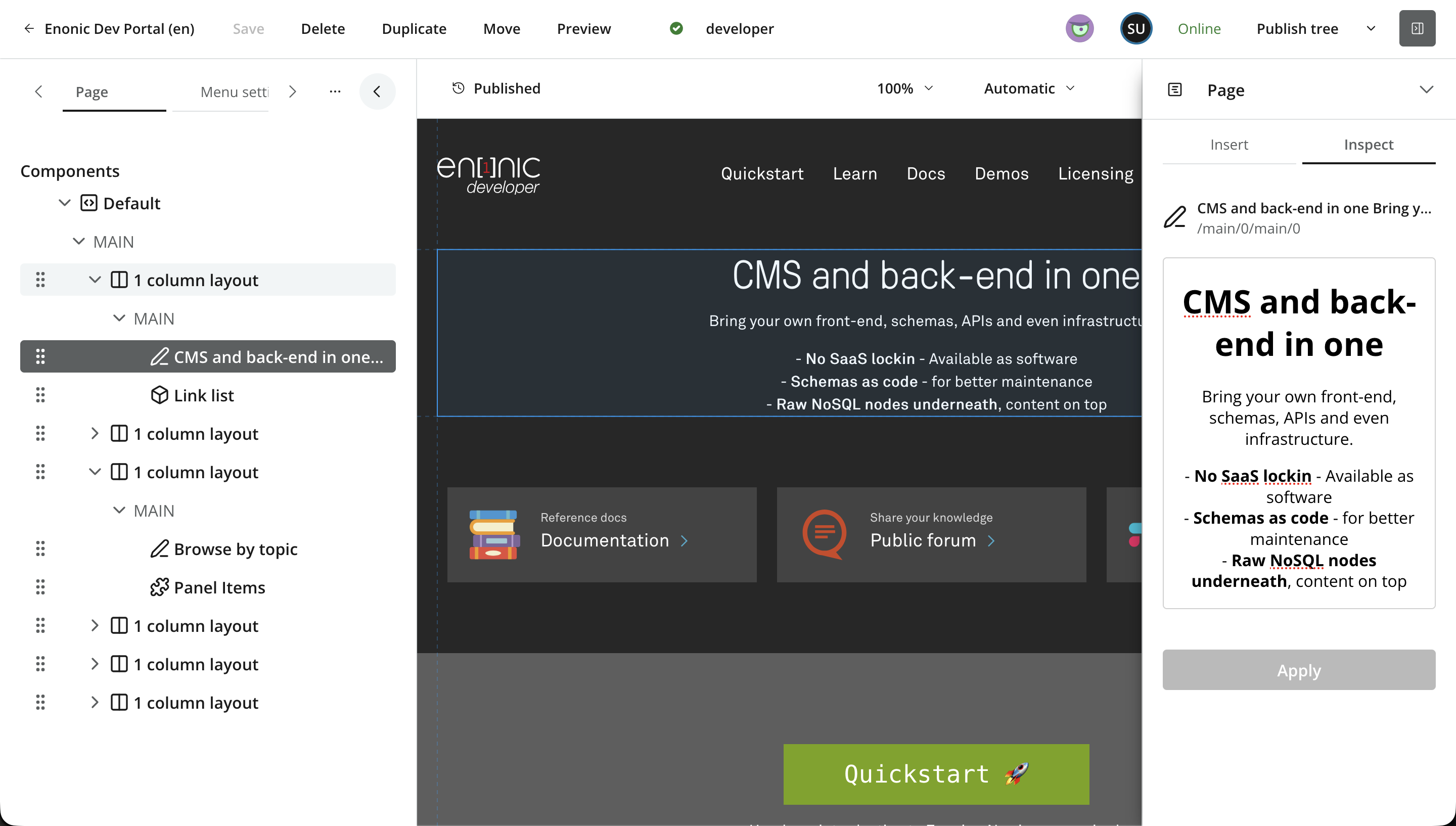
Enonic XP and Content Studio support an opinionated approach for building web sites and pages. This involves a concept for page components, a visual editor for arranging them, and a GraphQL API that delivers the page structure to the front-end.
Seen from Content Studio, a page and its component structure might look like this:
Main concepts
The page concept is made up of the following building blocks:
-
Sites — the root of a website, binding applications and unlocking page-building features.
-
Pages and regions The root component, defining the overall structure via regions.
-
Parts Leaf components, used to add content to a page.
-
Layouts Components that define regions, used for columnar or grouped presentation of parts.
-
Text A built-in component for inline rich text.
-
Page templates Reusable page setups that can be applied to content items automatically.
-
Fragments Reusable component instances shared across pages.
-
Visual editor — a Content Studio interface for building pages by dragging and dropping components, editing their content and configuring their presentation.
Front-end integration
Rendering a page’s component tree in a front-end framework — resolving parts and layouts into components, hydrating fragments, and keeping the visual editor in sync — is easier with a dedicated integration. See Front-end integration for the toolkits Enonic provides.