Content Studio 6 documentation - WIP
Contents
Content Studio is Enonic XP’s content-management UI — the editor-facing application for creating, organising, and publishing content.
| A collection of short videos demonstrating Content Studio’s features and capabilities is available on the Enonic site. |
For content modelling and schema references, go to the Enonic CMS docs.
Installation
Content Studio is a standalone Enonic XP application that can be installed from Enonic Market.
User interface
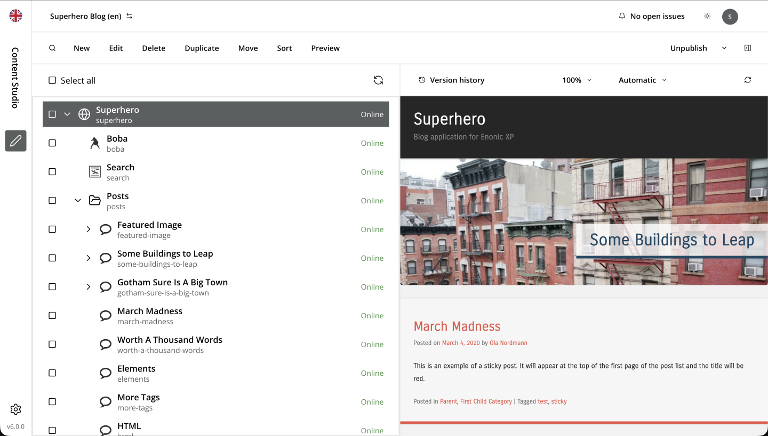
The Workbench is the application shell: a project bar on top, a menu bar on the left, and a main panel filling the rest. The default menuitem is the Navigator — the content tree, search, and per-content actions.
Autoring happesn in the Content Editor, which launches in a separate browser tab (Google Docs style) and provides a consistent interface for editing and previewing.
Concepts
A few recurring concepts surface everywhere in the UI — in dialogs, widgets, toolbars, and URLs.
Content items and content types
A content item is a single piece of content — an article, image, page, or site. Every item has an identity (path, display name, id), a type, a set of field values, and a small envelope of metadata (security, schedule, workflow state).
A content type is the schema that defines an item’s fields. Most are defined in application code; a handful ship with XP and have special behaviour:
-
Folder — a grouping container with no data fields beyond display name and path. See Folder.
-
Shortcut — a path that redirects to another content item. See Shortcut.
-
Site — the root of a website. Carries installed applications and gets a Templates folder as its first child. See Site.
-
Page template — a reusable page definition. See Page template.
-
Media — image, video, audio, and other binary uploads. See Media.
-
Image — backed by an image file, with cropping and focal-point tools. See Image.
-
Unstructured — formless content used by applications to store free-form data. See Unstructured.
-
Fragment — a reusable page component stored as a content item; edits propagate everywhere it’s referenced. See Fragment.
Pages and rendering
Page rendering is driven by three collaborating concepts: the content item, the page template that describes how to render it, and the page controller (from an installed application) that supplies the HTML skeleton. Page building happens in the Page editor.
Draft, master, and publishing
Content is always edited in the draft branch. Publishing copies the active draft version into the master branch, from which it becomes available to public consumers of the API.
Versions
Every save, publish, unpublish, rename, or permissions change creates a new version. Versions can be compared and reverted from the Version history widget — see Versions.
Dependencies
Content items reference each other — pages embed images, shortcuts target content, text fields link to other items. Dependencies are tracked in both directions (inbound: who uses this; outbound: what does this use). Publishing, archiving, and unpublishing all check dependencies — see Dependencies.
Permissions
Each content item has its own security settings: a list of principals (users, groups, roles) and the permission flags they have on that item (Read, Create, Modify, Delete, Publish, Read/Write permissions). Permissions are inherited from parent content by default and can be overridden per-item. See Permissions.
Archive
Deleting content is destructive. Archiving is the non-destructive alternative — items are moved to a separate archive storage where they can be browsed, restored, or permanently deleted later. See Archive.
Applications and extensions
An application is an installable unit of XP code that can contribute content types, page controllers, parts, layouts, translations, and UI widgets. Applications are attached to a site via its Applications field; some (like Juke and Content Studio+) contribute UI across all sites.
Extensions are typically small UI surfaces contributed by an application. The main host is the Context panel; applications can also contribute preview modes and menuitems.
Issues and publish requests
Issues are lightweight work items used to coordinate between editors — either a task (e.g. "spellcheck this article") or a publish request (review-and-publish handoff for users without publish permission, or for an approval flow). See Issues and Publish request.
Content Studio+
Content Studio itself is free and open source. An Enonic subscription unlocks Content Studio+, a companion application distributed on Enonic Market that adds advanced editorial capabilities:
-
Archive browser — the dedicated Archive menuitem for browsing, restoring, and permanently deleting archived content.
-
Content Variants — create and manage variant copies of a content item for A/B testing.
-
AI translation — automatic translation of inherited content when localising in a layer.
-
Layers widget — see the status of a content item across every layer in the system.
Without a valid license the Content Studio+ application can still be installed, but its UI contributions remain inactive. Pages that document a CS+ feature carry a Content Studio+ feature admonition at the top.
Artificial Intelligence
Enonic offers a growing suite of AI-powered features to assist editors in their work. These features are available as for subscription customers under the Juke AI brand, and can be installed from Enonic Market.
Browser support
Content Studio works in all modern browsers. We are explicitly testing and supporting the latest versions of Google Chrome, Apple Safari, Mozilla Firefox, and Microsoft Edge.
Release notes
Curious about what is new in this version? Check out the release notes.