Delete
Contents
The Delete action removes content from the active tree. Deleted items are not destroyed — they are moved to the Archive, from which they can later be restored or permanently removed.
There are three ways to invoke Delete:
-
Keyboard shortcut —
⌘ + delon macOS,ctrl + delon Windows/Linux. -
The Delete button in the toolbar.
-
The Delete entry in the context menu (right-click an item in the Navigator).
A selection is always deleted together with all of its descendants, so the archive preserves the original structure. The dialog lists every item that will be moved.
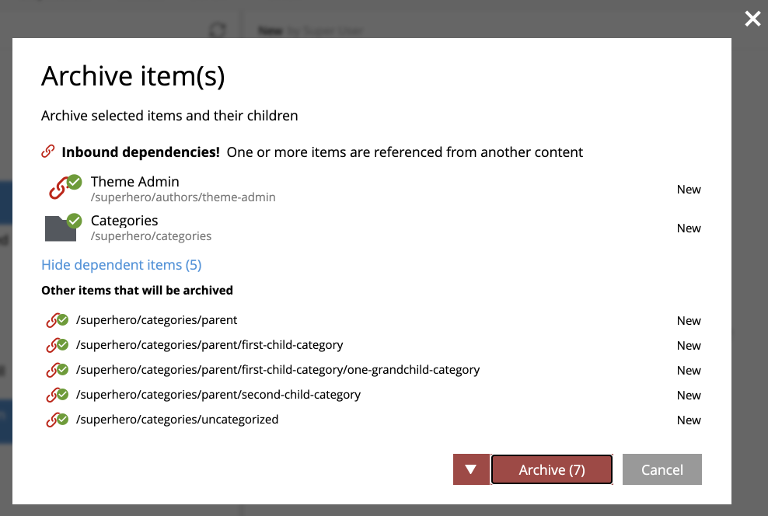
Online content (published items) is taken offline immediately when deleted. The item remains in master only until the delete completes, and end users lose access the moment the action is confirmed. |
Reference checks
If any item in the selection is referenced by other content that is not being deleted along with it, a warning appears at the top of the dialog and the action button is disabled. The referenced items are marked with a small "link" icon over their content-type icon.
Two links are available:
-
Ignore inbound references — proceed anyway. Referring content will then point at a non-existent item.
-
Show references — open the reference list for each flagged item, so the references can be edited out. Once the references are removed (and saved), the delete dialog refreshes and allows the action.
Permanent deletion
Delete is a soft operation — the content is moved into the Archive and remains recoverable. Permanent deletion happens only from the Archive view, where a separate Delete action physically removes the item from storage. Permanent deletion is not reversible (short of a snapshot restore).

Delete in layers
Delete behaves specifically when layers are involved:
-
An item deleted in a parent project is deleted in all child layers where it is not localised.
-
Deleting an inherited (non-localised) item in a layer removes it from that layer without touching the parent — a useful way to prune inherited content from a layer.
-
Restoring from a layer’s archive may recreate the item in the layer if the original still exists in the parent.