Unpublish
Contents
The Unpublish action takes published content offline by removing it from the master branch. Its draft remains available in Content Studio for editing and publishing again. See Publish state for how online and offline content is represented.
Unpublishing content
Choose Unpublish from the toolbar or context menu. The action applies to published content.
The dialog lists the selected content first. Published descendants are included automatically under Other items that will be unpublished. Review the entire list before proceeding: unpublishing a parent also takes its published children offline.
The Unpublish button shows the total number of affected items when there is more than one. In the example below, the selected Authors folder and its two author items will all be unpublished. Published content references both authors, so reference checks initially block the action.
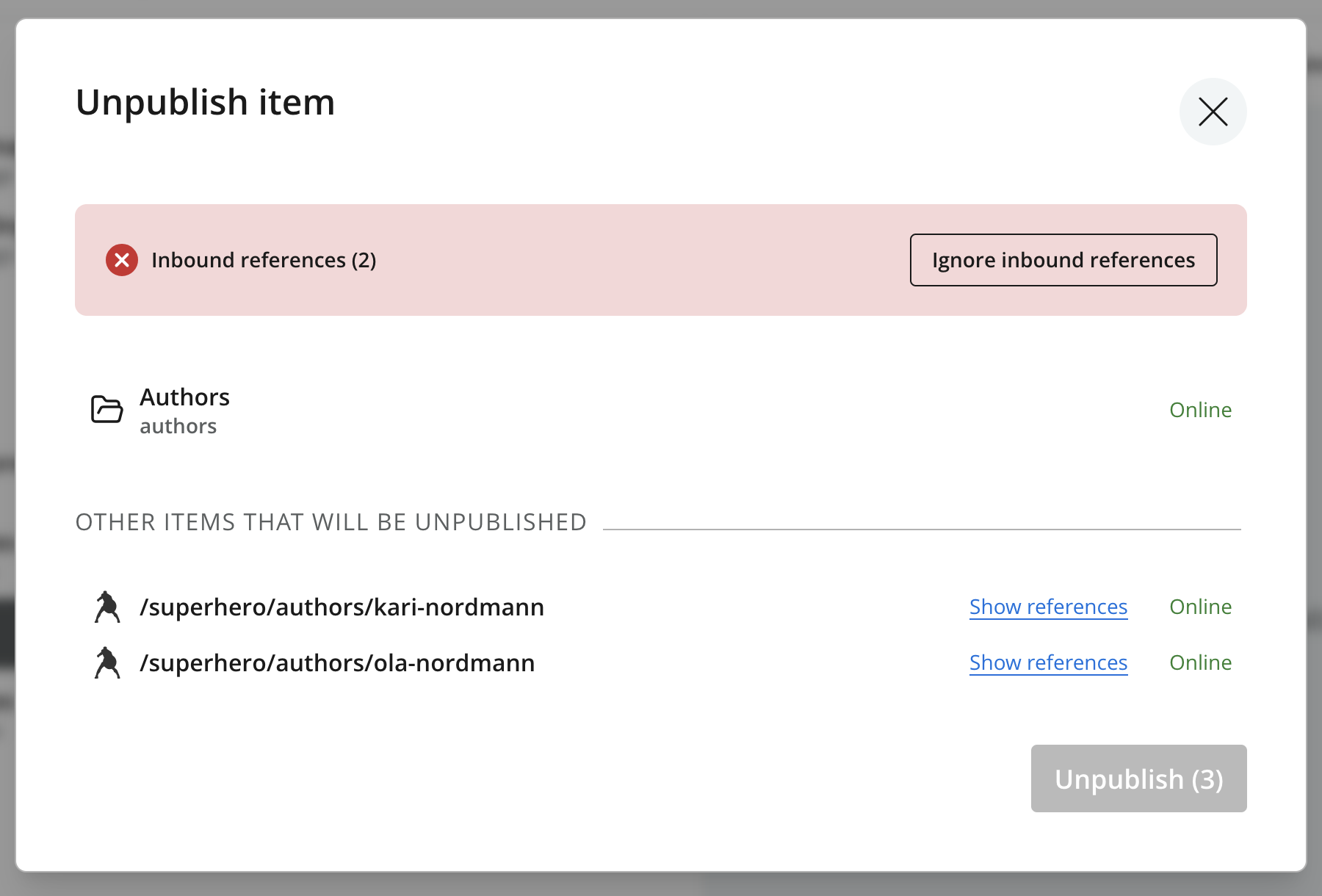
Once any blocking references have been resolved or ignored, click Unpublish to take the listed items offline.
| When unpublishing multiple items or a site, an additional confirmation asks you to enter the total number of affected items. |
Reference checks
If published content outside the batch references any of the listed items, an Inbound references warning blocks unpublishing. Remove or replace those references and publish the changes so the online versions no longer depend on the item. Saving draft changes alone does not remove published references.
See Reference checks for Show references and Ignore inbound references. The warning counts the affected items being unpublished, rather than the individual references to them.
| Ignoring references leaves the referring content online with references to content that is now offline. Links or embedded content may stop working. |